Situation
When you manage a large-scale infrastructure, patching isn’t as simple as running dnf update on all machines simultaneously. You often have strict dependencies: Database servers must go down last and come up first, while Application servers depend on the DBs being available. Sometimes, specialized environments (like SAP) need to be handled separately.
In our workflow, we use a structured approach with Ansible to patch servers in specific “waves”.
Task 1 – Defining the Waves in Inventory
We organize our inventory into groups representing the different waves. For example, in our development environment inventory, we might have:
dev_patch_wave01_db: Database servers.dev_patch_wave02_app: Application servers.dev_patch_wave03_special: Specialized or standalone servers.
Task 2 – Verifying the Target Hosts
Before executing any patching playbook, it’s critical to verify exactly which servers will be affected. We use the --list-hosts flag combined with the --limit parameter targeting the specific wave.
# Check which DB servers are going to be patched in wave 1
ansible-playbook -i inventory/dev/ playbooks/patching.yml
  --limit='dev_patch_wave01_db' --list-hosts
Task 3 – Executing the Patching Playbook in Order
Once verified, we execute the patching playbooks in the required sequence. We typically separate the “update” process from the “reboot” process to have more control.
Wave 1: Databases
We patch the DB servers first and wait for the DB administrators to confirm everything is back up and running.
# Run the patching playbook for wave 1
ansible-playbook -i inventory/dev/ playbooks/patching.yml
  --limit='dev_patch_wave01_db'

# Reboot wave 1 servers
ansible-playbook -i inventory/dev/ playbooks/rebooting.yml
  --limit='dev_patch_wave01_db'
Wave 2: Applications
After confirming the databases are healthy, we move on to the application tier.
# Run the patching playbook for wave 2
ansible-playbook -i inventory/dev/ playbooks/patching.yml
  --limit='dev_patch_wave02_app'

# Reboot wave 2 servers
ansible-playbook -i inventory/dev/ playbooks/rebooting.yml
  --limit='dev_patch_wave02_app'
Wave 3: Specialized Systems
Finally, we handle systems that might require manual intervention or specific shutdown procedures before patching.
ansible-playbook -i inventory/dev/ playbooks/patching.yml
  --limit='dev_patch_wave03_special'
By strictly using --limit and well-defined inventory groups, we prevent accidental updates to dependent systems and ensure a smooth, verifiable patching cycle.
Pipeline Architecture Diagram
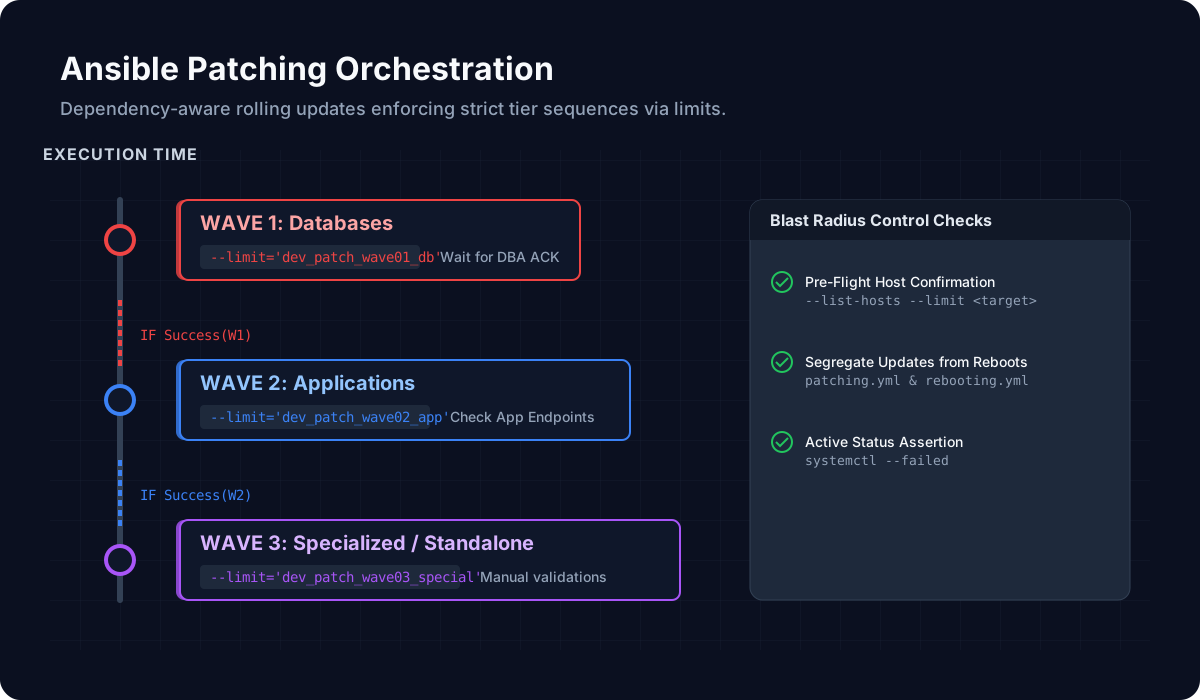
This architecture diagram visualizes the Ansible Patching Orchestration timeline. It illustrates the enforced, dependency-aware sequence: starting with the critical Database tier (Wave 1), gating subsequent execution until validation passes, cascading to Application servers (Wave 2), and finally isolating Specialized systems (Wave 3). The right panel highlights the invariant blast-radius controls applied regardless of the wave limit.
Post-Specific Engineering Lens
For this post, the primary objective is: Increase automation reliability and reduce human variance.
Implementation decisions for this case
- Chose a staged approach centered on ansible to avoid high-blast-radius rollouts.
- Used patching checkpoints to make regressions observable before full rollout.
- Treated automation documentation as part of delivery, not a post-task artifact.
Practical command path
These are representative execution checkpoints relevant to this post:
ansible-playbook site.yml --limit target --check --diff
ansible-playbook site.yml --limit target
ansible all -m ping -o
Validation Matrix
| Validation goal | What to baseline | What confirms success |
|---|---|---|
| Functional stability | service availability, package state, SELinux/firewall posture | systemctl --failed stays empty |
| Operational safety | rollback ownership + change window | journalctl -p err -b has no new regressions |
| Production readiness | monitoring visibility and handoff notes | critical endpoint checks pass from at least two network zones |
Failure Modes and Mitigations
| Failure mode | Why it appears in this type of work | Mitigation used in this post pattern |
|---|---|---|
| Inventory scope error | Wrong hosts receive a valid but unintended change | Use explicit host limits and pre-flight host list confirmation |
| Role variable drift | Different environments behave inconsistently | Pin defaults and validate required vars in CI |
| Undocumented manual step | Automation appears successful but remains incomplete | Move manual steps into pre/post tasks with assertions |
Recruiter-Readable Impact Summary
- Scope: deliver Linux platform changes with controlled blast radius.
- Execution quality: guarded by staged checks and explicit rollback triggers.
- Outcome signal: repeatable implementation that can be handed over without hidden steps.