📌 The Architectural Challenge
In a critical corporate environment, a development team requested the provisioning of a single RHEL 9 server to host four independent instances of a web application server (Tomcat). Their primary requirement was that each application must be accessible via its own corporate DNS name (e.g., app1-dev.corp.local) without port conflicts (avoiding the classic Address already in use error on port 8443).
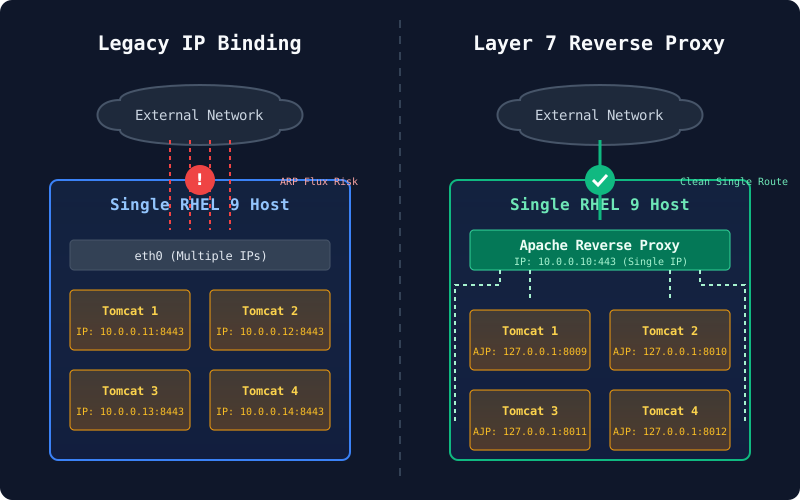
The Legacy Proposal: The team requested configuring multiple secondary IPs (IP Aliasing) on the server’s single network interface, assigning each Tomcat instance to a distinct IP address.
🛑 Risk Assessment and Pushback
As an Infrastructure Engineer, I pushed back against implementing multiple IPs on a single interface due to the severe operational risks this introduces in modern Linux systems:
- ARP Flux and Asymmetric Routing: The Linux kernel can become inconsistent when routing outbound traffic, causing stateful firewalls to randomly drop packets.
- Visibility and Troubleshooting: Logically grouping services on a single host via different IPs obscures network monitoring. A traffic spike on the physical interface becomes nearly impossible to correlate with a specific application.
- False Sense of Isolation: Even if we resolved the network conflict, the four applications would still share the same Compute (CPU/RAM). A memory leak in one instance could trigger the kernel’s OOM Killer, affecting the others (a shared “Blast Radius”).
💡 The Solution: Reverse Proxy Architecture with Apache and AJP
To meet the developers’ requirements (clean URLs per application) while guaranteeing system stability, I designed a transition towards a Layer 7 Reverse Proxy architecture.
The solution consisted of:
- A Single Physical IP: Eliminating any asymmetric routing issues.
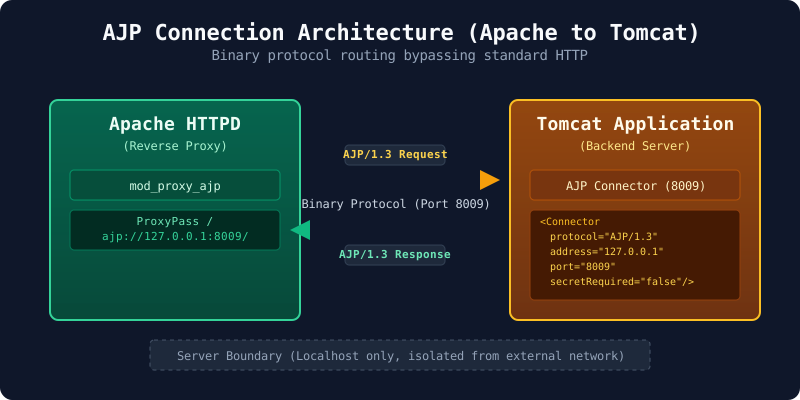
- AJP Protocol (Apache JServ Protocol): Configuring Apache to communicate with the Tomcat backends using the binary AJP protocol (ports 8009, 8010, etc.), which is faster and more secure than proxying via standard HTTP.
- Strict Security (HTTPS Only): Port 80 (HTTP) traffic was completely blocked at the Firewalld level, exclusively forcing encrypted traffic through port 443.
- SAN Certificate (Subject Alternative Name): A single multi-domain TLS/SSL certificate was generated to avoid the maintenance overhead of managing a distinct certificate for each DNS alias.
🛠️ Implementation as Code (Infrastructure as Code)
To deploy this solution without modifying the core code of our Ansible role, I injected the configuration through the inventory (host_vars) and static templates. This process required changes on both the Apache proxy side and the backend Tomcat configuration.
1. Tomcat Backend Configuration (server.xml)
For Apache to successfully route traffic using the binary AJP protocol, each Tomcat backend must be explicitly configured to listen for AJP connections. This requires modifying Tomcat’s server.xml file.
<!-- Define an AJP 1.3 Connector on port 8009 -->
<Connector address="127.0.0.1"
           port="8009"
           protocol="AJP/1.3"
           redirectPort="8443"
           secretRequired="false"/>
Key Configuration Details:
address="127.0.0.1": Crucial for security. The AJP connector must only listen on the localhost interface. It should never be exposed to the external network, as AJP is a highly trusted protocol meant only for reverse proxies.port="8009": The unique port assigned to this specific Tomcat instance. (e.g., App 2 would use8010, App 38011).protocol="AJP/1.3": Enables the binary protocol, which is more efficient for proxying than standard HTTP.secretRequired="false": In legacy environments or internal isolated loops, this is often set to false. However, for modern hardened setups, configuring a shared secret between Apache and Tomcat is recommended.
2. Environment Variables (host_vars)
The server was configured to disable HTTP, force HTTPS, and enable the critical SELinux booleans to allow network proxying.
# app_apache configuration overrides
app_apache_http_only: false
app_apache_https_enable: true
app_apache_redirect_http_to_https: false # Strict HTTPS only

dns_cnames:
  - "proxy01.corp.local"

app_apache_server_name_https: "{{ dns_cnames[0] }}"
app_apache_server_alias_https: "{{ dns_cnames[0].split('.')[0] }}"

# CRITICAL: Allow Apache to connect to backend Tomcat ports via SELinux
app_apache_setsebool_httpd_can_network_connect: true

# Injection paths for dynamic VirtualHosts and SAN certificates
app_apache_server_config_file_path_src: "{{ inventory_dir }}/host_vars/{{ inventory_hostname }}/apache/vhost.conf"
app_apache_server_certificate_path_src: "{{ inventory_dir }}/host_vars/{{ inventory_hostname }}/certs/proxy01.crt"
3. Routing Configuration (vhost.conf)
A static VirtualHosts file was injected. To prevent Information Disclosure for security reasons, the exact paths to the code repository were omitted from the comments, redirecting administrators to the official ITSM process.
# ==============================================================================
# ANSIBLE MANAGED FILE
# ==============================================================================
# DO NOT EDIT THIS FILE MANUALLY.
# This configuration is centrally managed via Ansible by the Infrastructure Team.
# Any manual changes made locally on this server will be overwritten without warning
# during the next playbook execution.
#
# To request changes to this configuration, please follow the standard IT Service
# Management process or submit a Pull Request to the automation repository.
# ==============================================================================

LoadModule proxy_ajp_module modules/mod_proxy_ajp.so

# ---------------------------------------------------------
# Application A: Finance Portal
# ---------------------------------------------------------
<VirtualHost *:443>
    ServerName finance-dev.corp.local

    SSLEngine on
    SSLCertificateFile /etc/pki/tls/certs/proxy01.crt
    SSLCertificateKeyFile /etc/pki/tls/private/proxy01.key

    ProxyPass / ajp://localhost:8009/ timeout=20000 Keepalive=On
    ProxyPassReverse / ajp://localhost:8009/
    ProxyPassReverseCookiePath / /
    ProxyTimeout 3600
</VirtualHost>

# ---------------------------------------------------------
# Application B: HR Portal
# ---------------------------------------------------------
<VirtualHost *:443>
    ServerName hr-dev.corp.local

    SSLEngine on
    SSLCertificateFile /etc/pki/tls/certs/proxy01.crt
    SSLCertificateKeyFile /etc/pki/tls/private/proxy01.key

    ProxyPass / ajp://localhost:8010/ timeout=20000 Keepalive=On
    ProxyPassReverse / ajp://localhost:8010/
    ProxyPassReverseCookiePath / /
    ProxyTimeout 3600
</VirtualHost>
🎯 Conclusion
By challenging the initial requirements and aligning the infrastructure with modern standards, we avoided creating “technical debt” at the network layer. This architecture not only provided the logical segmentation required by the developers, but also integrated seamlessly with our automated deployment pipelines (CI/CD) and maintained a robust security posture (strict TLS and SELinux integrity).