The Background
We’d been running our AI backend on Azure OpenAI for a few months using the default Pay-As-You-Go pricing. It was straightforward—send tokens, pay for tokens. No upfront costs, no commitments, costs scaled exactly with usage. Perfect for getting started.
The problem crept in gradually. As our user base grew, we’d occasionally see bursts of HTTP 429 errors during busy periods. Our monitoring showed latency spiking at seemingly random times. When I reached out to Microsoft support, they explained something I hadn’t fully internalized: Pay-As-You-Go has no performance guarantees whatsoever. Your requests get whatever capacity is left after the provisioned customers are served.
That’s when they mentioned Provisioned Throughput Units (PTU). It sounded like exactly what we needed—guaranteed capacity—but the pricing model is completely different. Instead of paying per token, you reserve a fixed amount of throughput capacity. This creates a classic optimization problem: at what volume does the fixed cost of PTU become cheaper than the variable cost of Pay-As-You-Go?
What Pay-As-You-Go Actually Means
Most people think of Pay-As-You-Go as “fair” pricing—you pay for what you use. What they don’t tell you upfront is that you’re also accepting:
No throughput floor. Microsoft doesn’t commit to processing any specific number of requests per minute. During traffic spikes (which might be your spikes or someone else’s), your requests wait in line.
Variable latency. When the datacenter is busy, your inference takes longer. We’ve seen p95 latency double during peak hours with no changes on our end.
Best-effort service. Your requests compete with everyone else’s in the same Azure region. There’s no prioritization.
For a side project or internal tool, this is totally acceptable. For a production system where customers expect consistent response times, it becomes a liability.
How Provisioned Throughput Works
PTU flips the model. Instead of paying per token, you reserve compute capacity:
| Aspect | Pay-As-You-Go | Provisioned Throughput |
|---|---|---|
| Cost Model | Per-token (input + output) | Fixed hourly rate |
| Throughput | Best-effort | Guaranteed capacity |
| Scaling | Automatic, elastic | Manual (add/remove PTU) |
| Overflow | Just pay more | Fallback to Pay-As-You-Go rates |
| Commitment | None | Monthly or yearly |
The key insight: PTU is capacity reservation, not token pricing. You reserve 50 PTU in a specific region, and that capacity is yours. Whether you use it or not, you pay for it.
The Fine Print
Here’s what I learned from the documentation and our conversations with Microsoft:
- Minimum reservation: 15 PTU for EU Data Zone, increasing in increments of 5
- Regional lock-in: Your reservation is tied to a specific region and deployment type
- Model sharing: PTU reservations are shared across models in the same deployment family
- Overflow safety net: Usage above your reservation isn’t rejected—it just falls back to Pay-As-You-Go pricing
The Math: Calculating Your Break-Even Point
This is where it gets interesting. To figure out if PTU makes sense, you need to model your actual usage. Here’s the framework I built:
Step 1: Gather Real Metrics
Don’t guess. Pull these from your actual Azure logs or application monitoring:
- Average prompt tokens per request
- Average completion tokens per request
- Peak requests per minute (not average—use the 95th percentile)
Step 2: Calculate Effective Input Tokens
Not all tokens cost the same. You need to account for:
// Formula for effective input calculation
const effectiveInput = promptTokens * (1 - cacheHitRate) + completionTokens * outputMultiplier;

// Most models use outputMultiplier = 1.0
// Check your specific model docs for exceptions
The prompt cache part is huge. If your system prompt is identical across requests (which it usually is), Azure can cache it and you get those tokens for free. A high cache hit rate dramatically improves PTU economics.
Step 3: Convert to Tokens Per Minute
const tokensPerMinute = effectiveInput * requestsPerMinute;Step 4: Size Your PTU Reservation
Microsoft publishes TPM (tokens per minute) per PTU ratios for each model. From their documentation:
| Model | Approximate Input TPM per PTU |
|---|---|
| GPT-4o | ~100K - 200K |
| GPT-5-mini | ~200K - 400K |
Notice how the smaller model gives you significantly more throughput per PTU. If GPT-5-mini meets your quality bar, it changes the economics considerably.
const requiredPTU = Math.ceil(tokensPerMinute / inputTPMperPTU);
// Round up to nearest multiple of 5 (Azure's increment)
Step 5: Run the Numbers
Here’s where you compare the two models:
// Option A: Pay-As-You-Go
const paygCost =
  (monthlyInputTokens / 1_000_000) * inputPricePerM +
  (monthlyOutputTokens / 1_000_000) * outputPricePerM;

// Option B: PTU Reservation
const ptuCost = ptuCount * hourlyRate * 730; // hours per month

// The difference is your potential savings (or cost)
What I Learned from Actually Running the Numbers
Going through this exercise revealed several things that aren’t obvious from the marketing materials:
Prompt caching isn’t optional—it’s essential. If you’re not getting cache hits on your system prompt, PTU becomes much harder to justify. The 100% discount on cached tokens is what makes the math work at moderate volumes.
Model choice has massive economic impact. GPT-5-mini delivers roughly 2x the throughput per PTU compared to GPT-4o. For many applications, the quality difference is negligible but the cost difference is substantial.
Regional availability is a constraint. Not all regions support PTU, and the minimum commitments vary. In our target region (EU Data Zone), we had to commit to at least 15 PTU.
Reservation terms matter. Microsoft offers discounts for longer commitments—monthly vs yearly can be a 20-30% difference. If your usage is stable, the yearly commitment pays off quickly.
Overflow isn’t failure. One nice surprise: if you exceed your reserved capacity, you don’t get throttled. You just pay the Pay-As-You-Go rate for the excess. This means you can be conservative with your reservation and not worry about hard limits.
So When Does PTU Actually Make Sense?
Based on my analysis, PTU becomes attractive when:
- You’re processing more than ~500K-1M input tokens daily (model-dependent)
- You have actual latency requirements or SLAs to meet
- You need predictable monthly costs for budgeting
- Your traffic is relatively stable (not wild hour-to-hour swings)
- You’re getting good cache hit rates on prompts
Conversely, stick with Pay-As-You-Go if:
- Your usage is unpredictable or highly variable
- You’re still in early growth stages
- Cost savings matter more than performance guarantees
- Your volume is below the break-even threshold
What I’d Do Differently Next Time
If I were starting this evaluation again, I’d:
-
Run realistic load tests before committing to any reservation size. Microsoft’s PTU calculator helps, but your actual traffic patterns matter more than averages.
-
Check regional availability early. PTU isn’t available everywhere, and pricing varies by region. Don’t build your architecture around a region that doesn’t support your target model.
-
Start conservative. Begin with the minimum 15 PTU, monitor your overflow ratio for a month, then resize based on actual data.
-
Model yearly vs monthly. If your usage is stable, the yearly commitment discount is usually worth it.
Architecture Overview
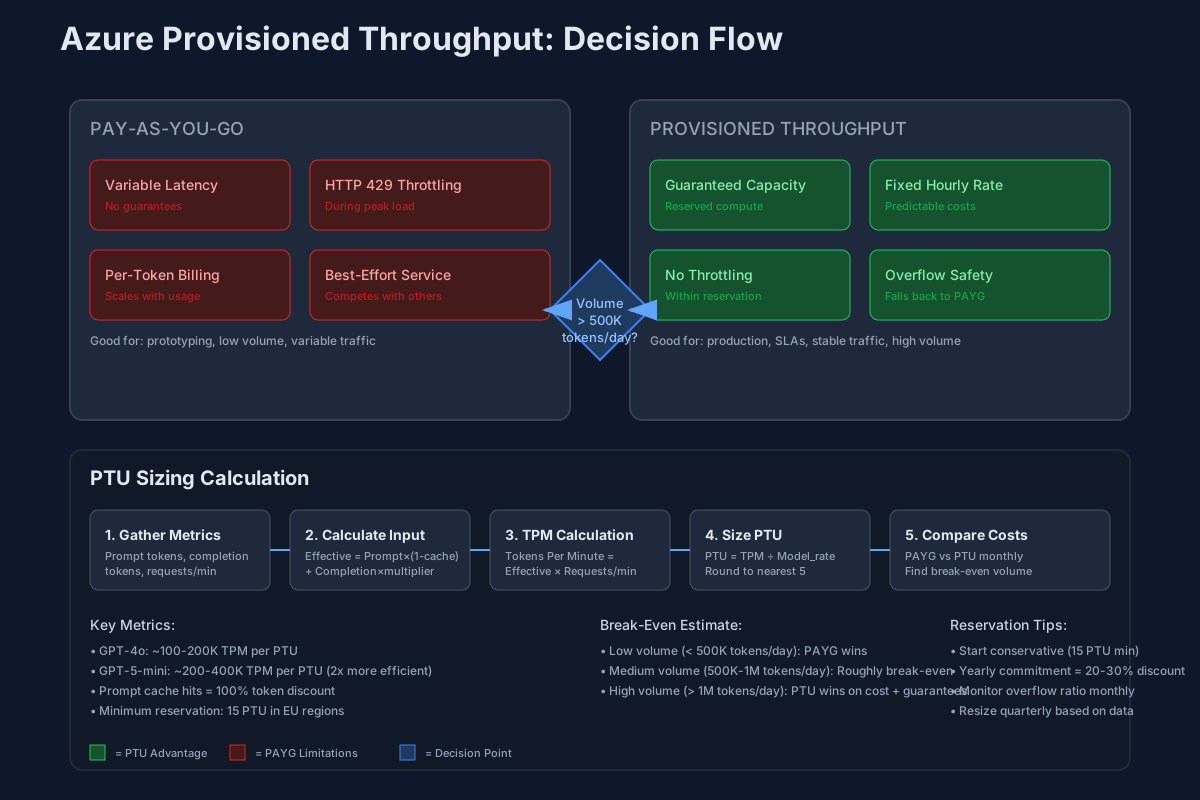
This diagram shows how requests flow through a PTU-enabled deployment, including how overflow traffic gets handled and where the cost calculations fit into the architecture.
Engineering Notes
The hardest part of this analysis wasn’t the math—it was getting good data. Azure’s cost explorer gives you aggregates, but you need per-request metrics to properly model PTU sizing. I ended up exporting logs to BigQuery and running analysis there.
Key Metrics to Track
- Token volume by hour (not just daily totals)
- Cache hit rates by prompt type
- P50/P95/P99 latency distributions
- HTTP 429 error rates
Sizing Script
# Pull 30 days of token metrics
az monitor metrics list \
  --resource $OPENAI_RESOURCE_ID \
  --metric TokenUsage \
  --interval PT1H \
  --offset 30d \
  --output json | \
  jq '.value[].timeseries[].data[] | {timestamp: .timeStamp, tokens: .total}'

# Analyze for PTU sizing
python3 analyze_ptu_feasibility.py \
  --metrics token_usage.json \
  --model gpt-4o \
  --region westeurope \
  --output ptu_recommendation.json
Validation Checklist
| Goal | Baseline | Success Criteria |
|---|---|---|
| Cost accuracy | 30 days Pay-As-You-Go spend | PTU cost ≤ 1.2x PAYG at peak traffic |
| Performance consistency | P95 latency spikes during peak | PTU shows <10% latency variance |
| Overflow handling | 429 errors during traffic bursts | Graceful fallback with minimal cost impact |
What Could Go Wrong
| Failure Mode | Why It Happens | How to Avoid |
|---|---|---|
| Over-reservation | Traffic lower than projected | Start with minimum 15 PTU, scale based on data |
| Under-reservation | Unexpected traffic growth | Monitor overflow ratio, resize quarterly |
| Regional limitations | PTU not available for your model/region | Check availability before architectural decisions |
Bottom Line
We ended up reserving 20 PTU for our production workload. At our current volume, it’s roughly break-even on cost, but the operational benefits—predictable latency, no throttling, capacity planning we can actually rely on—make it worthwhile.
The exercise also forced us to optimize our prompt caching, which ended up saving us money regardless of the pricing model. Sometimes the value of these analyses isn’t just the decision you make—it’s the insights you uncover along the way.
References
The analysis in this post is based on Microsoft’s official documentation for Azure AI Foundry and OpenAI provisioned throughput:
- Understanding costs associated with provisioned throughput units (PTU) - Microsoft Foundry
- Save costs with Microsoft Foundry Provisioned Throughput Reservations - Microsoft Cost Management
- Provisioned throughput unit (PTU) costs and billing - Microsoft Foundry
- What Is Provisioned Throughput for Foundry Models?
- Understanding deployment types in Microsoft Foundry Models
- Azure OpenAI provisioned throughput onboarding guide