118B MoE on a single 32GB GPU: Laguna S 2.1 partial expert offload
All numbers below come from a single B70 workstation on 2026-07-23, measured with llama.cpp engine timings.
Hardware and stack
Intel Arc Pro B70 32GB at 150W eco tier, Ryzen 7 5700X3D with 32 GB DDR4-3200, NVMe SSD at 3.5 GB/s. Running the Poolside llama.cpp fork (commit 04b2b72, branch laguna) with SYCL/Level Zero on oneAPI 2026.0.0, flash attention on, KV cache q8_0 K + q4_1 V.
Production benchmarks (LocalMaxxing, 2026-07-22)
These are the current production numbers from the same B70 workstation, submitted to LocalMaxxing with the same build (b10053 + PR #25690), flash attention on, KV cache q8_0 K / q4_1 V.
| Model | Quant | Config | Prefill t/s | Gen t/s |
|---|---|---|---|---|
| Qwen3.6-35B-A3B | UD-Q4_K_XL | 256K, 150W | 1,603.5 | 69.7 |
| Qwen3.6-35B-A3B | UD-Q5_K_M | 256K, 150W | 1,601.3 | 67.0 |
| Ornith-1.0-35B | Q5_K_M | 256K, 150W | 1,589.8 | 78.7 |
| ThinkingCap-Qwen3.6-27B | Q4_K_M | 200K, MTP-4, 165W | 621.3 | 27.5 |
The setup
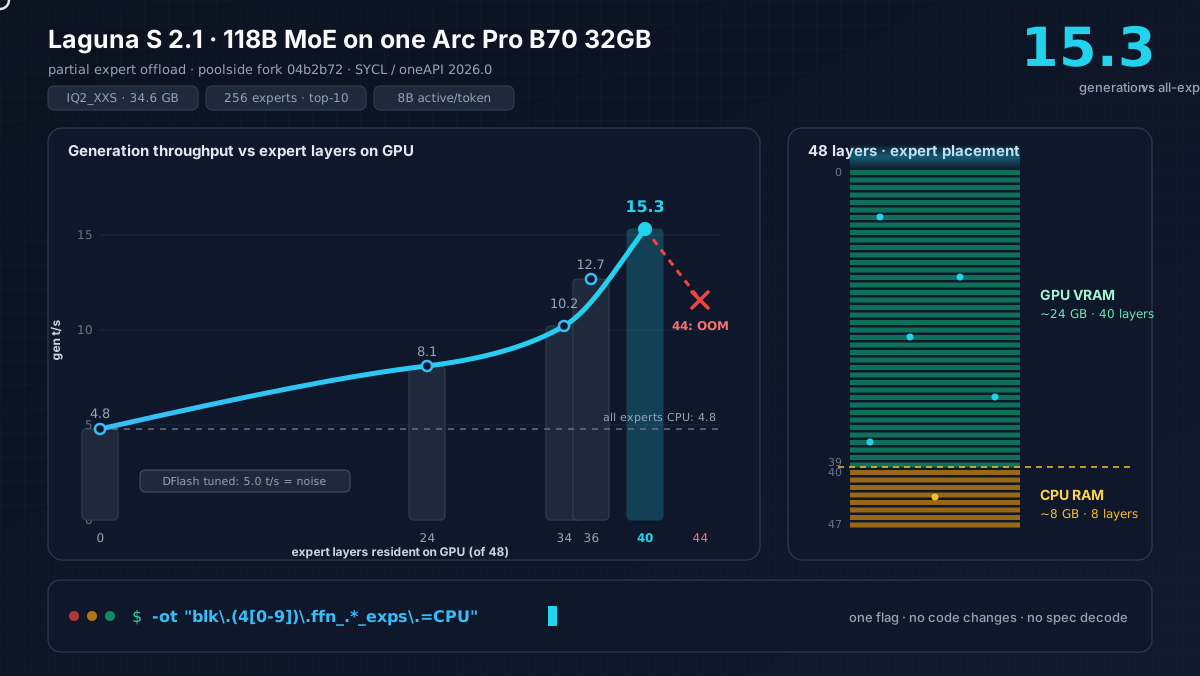
Laguna S 2.1 is 34.6 GB at IQ2_XXS (Unsloth Dynamic), and the B70 has 32 GB VRAM. The model packs 256 routed experts plus 1 shared, with top-10 routing and 8B active per token, so most of the weight lives in expert layers that only a fraction of tokens touch during any given forward pass.
The standard way to run an MoE model that doesn’t fit in VRAM is -ot ".*ffn.*exps.*=CPU", which puts all expert weights on CPU and keeps attention and dense layers on GPU. It works, but it gave me 4.8 tokens per second. I checked the verbose log and found only 2.4 GB of VRAM in use, meaning 24 GB was sitting completely idle while every single token triggered CPU expert lookups across 256 experts per layer.
Partial expert offload
The fix is to stop treating it as all-or-nothing. Instead of dumping every expert to CPU, keep experts for the first N layers on GPU and send only the remaining layers to CPU:
-ot "blk\.(4[0-9])\.ffn_.*_exps\.=CPU"This keeps experts for layers 0 through 39 on GPU (40 of 48 layers), while layers 40 through 47 stay on CPU. The split uses about 24 GB of VRAM for weights and leaves roughly 8 GB of experts CPU-resident, which fills the GPU without overflowing it.
Benchmark sweep
I ran a sweep from all-CPU to max-GPU to find where the B70 runs out of VRAM, using the same prompt (Python prime checker with docstring and type hints, 200 tokens output) across every configuration.
| Expert placement | GPU layers | CPU layers | Gen t/s | PP t/s | vs baseline |
|---|---|---|---|---|---|
| All experts CPU | 0 | 48 | 4.8 | 1.5 | 1.0x |
| Layers 0-23 GPU | 24 | 24 | 8.1 | 1.9 | 1.7x |
| Layers 0-33 GPU | 34 | 14 | 10.2 | 2.7 | 2.1x |
| Layers 0-35 GPU | 36 | 12 | 12.7 | 3.0 | 2.6x |
| Layers 0-39 GPU | 40 | 8 | 15.3 | 4.2 | 3.2x |
| Layers 0-43 GPU | 44 | 4 | OOM | — | crash |
Each additional GPU layer set adds roughly 2 t/s until you hit the VRAM wall. Pushing past 40 GPU layers crashes the system entirely (layers 0-43 OOM’d the machine), so 40 is the safe ceiling on a 32 GB card with this quantization and context size.
Quality at IQ2_XXS
I tested three prompt types and all produced coherent output. The model identifies itself as Poolside, generates correct Python with proper docstrings and type hints, and reasons through arithmetic problems like 17 × 23 step by step. IQ2_XXS is 2.06 bits per weight, which is aggressive, but the model holds up well here with no garbled output or repetition loops across any of the test prompts.
DFlash speculative decoding
Poolside ships a 2.1 GB DFlash draft model for speculative decoding, where a small model predicts blocks of tokens that the big model then verifies in a single batched pass instead of generating one token at a time. The theoretical win is fewer forward passes through the expensive expert layers.
@lukepm tested this on X with 2× RTX 5090 and found that default flags made it 2.5x slower than running without the draft. His key finding was that --spec-draft-p-min defaults to 0.0, which forces the drafter to ship every token regardless of confidence, so only about 1.6 of 15 drafted tokens survive verification. Setting it to 0.6-0.75 fixed acceptance rates and brought throughput back to parity with the baseline.
I tested on the B70 with his tuned flags (--spec-draft-n-max 7 --spec-draft-p-min 0.75) and got 5.0 t/s against a 4.8 t/s baseline, which is within measurement noise. The reason is architectural: Laguna routes each token to 10 of 256 experts, so a 16-token verification batch can touch up to 160 different experts per layer. When those experts are CPU-resident, the verification cost scales linearly with draft batch size. Speculative decoding helps when GPU compute is the bottleneck, but here the bottleneck is expert memory access, so adding more verify tokens just adds more CPU expert lookups.
This matches @lukepm’s finding even on his dual 5090 setup, where tuned DFlash landed at +2.7%. On a single GPU he got +8.3%, and his conclusion was the same as mine: skip it unless your workload is heavily math or translation.
How to apply this
The technique works for any MoE model in llama.cpp, not just Laguna, because the -ot flag accepts regex patterns that can target specific layer ranges. Run with -v and check how much VRAM you’re actually using, and if it’s far below your total capacity you’re leaving performance on the table. Then use partial expert offload with -ot "blk\.(N[0-9])\.ffn_.*_exps\.=CPU" where N is the first layer you want on CPU, and fill VRAM until you’re about 1 GB from the limit before backing off one layer. Skip speculative decoding for fine-grained MoE models with partial offload, since the verification overhead from CPU expert streaming cancels out whatever the draft model saves.
The Doctor-Shotgun guide on HuggingFace covers the general approach to CPU+GPU MoE splitting in more depth, including tensor-type prioritization (down_exps before up_exps before gate_exps) for multi-GPU setups.