Situation
When replacing legacy infrastructure, the biggest challenge isn’t the technical migration—it’s doing it without disrupting users. I recently led a migration where a cluster of servers handling critical application traffic needed replacement, but the business couldn’t tolerate any downtime.
The legacy system had:
- Multiple DNS aliases (load balancer names, service-specific names, environment-specific names)
- SSL certificates bound to specific DNS names
- Applications with hardcoded hostname references
- Dependencies across dev, test, and production environments
A simple “shutdown old, start new” approach would have caused hours of downtime and potential data loss. Instead, I designed a DNS-based migration strategy that allowed parallel operation and instant switchover.
The Migration Challenge
The Request:
The application team needed new infrastructure with the following requirements:
- New servers with different IPs in a modern data center
- Same DNS names for transparent migration
- Enhanced security with updated certificates
- Ability to test thoroughly before cutting over production traffic
The Constraint:
The legacy system couldn’t be shut down until the new system was fully validated. However, DNS names were already in use, and certificates were tied to those names.
Phase 1: DNS Planning and Temporary Records
DNS Naming Strategy:
I created a two-tier DNS naming approach:
| Purpose | Temporary Name | Production Name |
|---|---|---|
| Primary Load Balancer | lb-temp-qa.domain.local | lb-qa.domain.local |
| Virtual Router | vrrp-temp-qa.domain.local | vrrp-qa.domain.local |
| Application Service | app-temp-qa.domain.local | app-qa.domain.local |
| Knowledge Base | kb-temp-qa.domain.local | kb-qa.domain.local |
| Worker Service | wk-temp-qa.domain.local | wk-qa.domain.local |
Step 1: Create Temporary DNS Records
Before deploying any servers, I worked with the DNS team to create “A” records for all temporary names:
DNS Record Type: A
Name: lb-temp-qa.domain.local
IP: 192.0.2.64 (new server IP)
TTL: 300 seconds (5 minutes for fast updates)
Why temporary names?
- Allows parallel operation of old and new systems
- Enables isolated testing without affecting production users
- Provides a clear rollback path (just don’t switch DNS)
- Keeps production traffic on the legacy system during validation
Phase 2: Multi-SAN Certificate Strategy
The Certificate Challenge:
Certificates are typically issued for specific DNS names. If we only include the production names, we can’t test the new system until cutover. If we only include temporary names, we can’t switch to production without new certificates.
Solution: Multi-SAN Certificate
I requested certificates that included BOTH temporary AND production DNS names:
openssl req -new -newkey rsa:2048 -nodes \
  -keyout tls_cert_qa.key \
  -out qa_migration.csr \
  -subj "/CN=lb-qa.domain.local" \
  -addext "subjectAltName = \
    DNS:lb-temp-qa.domain.local,\
    DNS:lb-qa.domain.local,\
    DNS:vrrp-temp-qa.domain.local,\
    DNS:vrrp-qa.domain.local,\
    DNS:app-temp-qa.domain.local,\
    DNS:app-qa.domain.local,\
    DNS:kb-temp-qa.domain.local,\
    DNS:kb-qa.domain.local,\
    DNS:wk-temp-qa.domain.local,\
DNS:wk-qa.domain.local"Benefits:
- Single certificate works for both temporary and production names
- No certificate changes needed during cutover
- Testing validates the exact certificate that production will use
- Reduces certificate management overhead
Phase 3: Server Configuration
Host Configuration:
On the new servers, configure network interfaces and hostnames:
# /etc/hostname
lb-qa

# /etc/hosts (for local resolution during testing)
192.0.2.64 lb-qa.domain.local lb-qa
192.0.2.65 vrrp-qa.domain.local vrrp-qa
Application Testing:
The application team configured their systems to point to the temporary DNS names:
https://lb-temp-qa.domain.localfor load balancer accesshttps://app-temp-qa.domain.localfor application endpointshttps://kb-temp-qa.domain.localfor knowledge base
Because the certificate included both temporary and production names, HTTPS worked seamlessly.
Phase 4: The Cutover (DNS Switchover)
Pre-Cutover Checklist:
- Application team confirms all tests pass on temporary names
- Performance benchmarks meet requirements
- Monitoring and alerting configured for new servers
- Rollback procedure documented and tested
- Maintenance window scheduled and communicated
- DNS team on standby for rapid updates
Cutover Execution (during maintenance window):
Step 1: Update DNS Records
Working with the DNS team, update each “A” record to point to the new server IPs:
BEFORE:
Name: lb-qa.domain.local → IP: 192.0.2.100 (old server)

AFTER:
Name: lb-qa.domain.local → IP: 192.0.2.64 (new server)
Step 2: Reduce TTL for Fast Propagation
Lower TTL (Time To Live) to 300 seconds before the change, so DNS caches expire quickly:
# Check DNS propagation
dig lb-qa.domain.local +short
# Should return new IP within 5 minutes
Step 3: Verify Services
# Test HTTPS endpoint
curl -vI https://lb-qa.domain.local

# Verify certificate is valid
openssl s_client -connect lb-qa.domain.local:443 -servername lb-qa.domain.local < /dev/null | grep -E "Verify|subject|issuer"

# Check application response
curl https://app-qa.domain.local/health
Step 4: Monitor Traffic
Watch application logs and monitoring dashboards:
- Confirm traffic is flowing to new servers
- Check for increased error rates
- Monitor response times
- Validate database connections
Step 5: Decommission Old System
After 24-48 hours of stable operation:
- Power down old servers (but don’t delete yet)
- Keep old DNS records available for quick rollback
- Archive old server configurations
Step 6: Clean Up Temporary Records
After one week of stable production operation:
- Remove temporary DNS records (
lb-temp-qa, etc.) - Update application configurations to use production names
- Archive temporary certificates (keep for audit)
Why This Approach Works
1. Zero Downtime
Production users never experience an outage because:
- Old system remains operational until the exact moment of DNS switch
- DNS propagation is fast (5-minute TTL)
- Certificate works for both old and new names
2. Parallel Testing
The application team can test extensively:
- Validate functionality on temporary names
- Performance test under load
- Security scanning and penetration testing
- User acceptance testing (UAT)
All without affecting production users.
3. Instant Rollback
If issues are discovered after cutover:
- DNS records can be reverted in minutes
- Old servers are still powered on
- No data loss (assuming database replication or shared storage)
4. Certificate Simplicity
Single certificate handles all scenarios:
- No emergency certificate reissuance
- Consistent security configuration
- Reduced operational complexity
Real-World Example: QA Environment Migration
Scenario:
Migrate a QA environment with the following services:
- Load balancer (
fss-qa) - Virtual router (
vrrp-qa) - Application server (
mh-qa) - Knowledge base (
kc-qa) - Worker service (
wk-qa)
Execution:
- Week 1-2: Deploy new servers, configure with temporary DNS names
- Week 3-4: Application team tests on temporary names
- Week 5: Performance validation, security scan
- Week 6 (Maintenance Window): DNS cutover
- Week 7: Monitor, validate, decommission old servers
- Week 8: Clean up temporary records
Result:
- Zero reported downtime
- All tests passed before cutover
- Rollback plan ready but not needed
- Template established for future migrations
Lessons Learned
Lesson 1: Start with DNS Planning
Don’t deploy servers until DNS strategy is clear. Get the DNS team involved early, understand TTL policies, and document the rollback procedure.
Lesson 2: Certificates Are Critical
Multi-SAN certificates are your friend. Include every DNS name you might use—temporary, production, and aliases. The marginal increase in certificate size is worth the operational simplicity.
Lesson 3: Test the Rollback
It’s not enough to have a rollback plan—test it. During a maintenance window in the test environment, practice switching DNS back and forth to ensure the process works.
Lesson 4: Communicate Clearly
Keep all stakeholders informed:
- Application teams know when to test
- DNS team knows when updates are needed
- Business stakeholders know the maintenance window
- Support teams know what to monitor
Lesson 5: Monitor DNS Propagation
Use tools like dig and online DNS propagation checkers to verify that DNS changes have propagated globally (if applicable) or across all internal DNS servers.
# Check which DNS server is authoritative
dig +nssearch lb-qa.domain.local

# Check propagation across multiple DNS servers
dig @dns1.company.com lb-qa.domain.local
dig @dns2.company.com lb-qa.domain.local
Impact and Metrics
Before this approach:
- Migrations required scheduled downtime (4-8 hours)
- Rollback was slow and risky
- Testing happened after cutover (production was the test environment)
- Certificate issues caused delays
After this approach:
- Zero-downtime migrations
- Rollback in under 5 minutes
- Testing completed before cutover
- No certificate-related delays
- Repeatable pattern for future migrations
DNS Migration Architecture
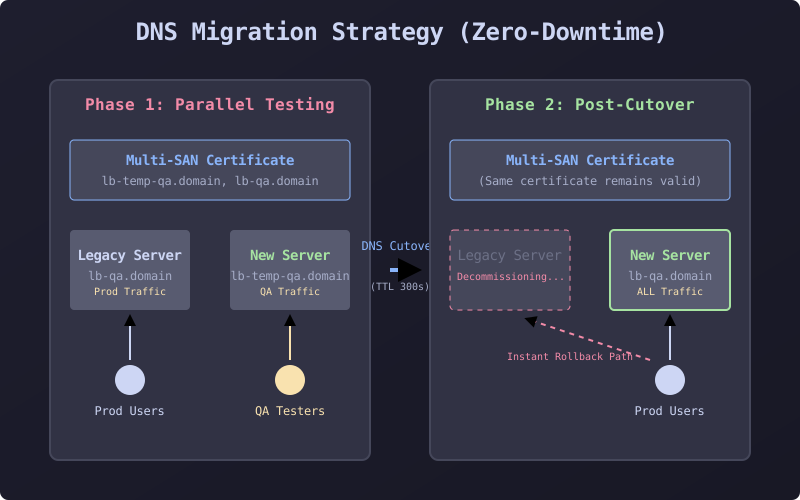
This diagram shows the DNS Migration architecture, illustrating how temporary and production DNS names coexist during testing, then switch over during the maintenance window with the multi-SAN certificate serving both phases.
Post-Specific Engineering Lens
For this post, the primary objective is: Enable safe infrastructure evolution without service disruption.
Implementation decisions for this case
- Chose DNS-based routing instead of load balancer reconfiguration for flexibility
- Used multi-SAN certificates to avoid certificate management during cutover
- Implemented low TTL (300s) for fast DNS propagation
- Maintained parallel operation for thorough validation
Practical command path
These are representative execution checkpoints:
dig lb-qa.domain.local +short
openssl req -new -newkey rsa:2048 -nodes -keyout cert.key -out cert.csr -addext "SAN=DNS:temp,DNS:prod"
curl -vI https://lb-qa.domain.local
ansible-playbook migrate-dns.yml --limit dns-servers --check
Validation Matrix
| Validation goal | What to baseline | What confirms success |
|---|---|---|
| DNS propagation | TTL values, authoritative nameservers | dig returns new IP within TTL window |
| Certificate validity | SAN entries, expiration date, chain | openssl s_client shows valid certificate for both names |
| Service availability | Response time, error rates, throughput | Application health checks pass, no increase in 5xx errors |
| Rollback readiness | DNS change procedure, server state | Rollback test completes in under 5 minutes |
Failure Modes and Mitigations
| Failure mode | Why it appears in this type of work | Mitigation used in this post pattern |
|---|---|---|
| DNS caching delays | Clients or intermediate resolvers ignore TTL | Use very low TTL (300s) 24h before migration |
| Certificate mismatch | Missing SAN entry for a DNS name | Include ALL names (temp + prod) in multi-SAN cert |
| Application hardcoded IPs | Apps bypass DNS and use direct IPs | Audit applications before migration, update configs |
| Database connectivity | DB connections tied to old server IPs | Use DNS names for DB connections, not IPs |
Recruiter-Readable Impact Summary
- Scope: Zero-downtime migration of business-critical QA and production systems
- Execution quality: Guarded by parallel testing, multi-SAN certificates, and instant rollback
- Outcome signal: Repeatable migration pattern adopted as standard for infrastructure replacements
- Technical depth: DNS management, PKI/certificates, load balancing, risk mitigation