Situation
When I started running LLMs locally on edge hardware, I made a fundamental mistake: I optimized for capacity (can the model fit?) instead of bandwidth (can the model run fast?).
The reality check came when I deployed a Discord bot on RK3588. CPU-only inference with Ollama delivered 0.21 tokens per second—37 seconds to answer “What is 2+2?”. That’s not a chatbot; that’s a broken experience.
This post captures the three optimization pillars that made local LLMs viable on constrained hardware.
Pillar 1: Memory Bandwidth Over Capacity
The Bandwidth Wall
Google’s paper “Challenges in Inference Hardware” and the Roofline Model explain the problem clearly:
| Memory Type | Bandwidth | Typical Use |
|---|---|---|
| GPU VRAM | ~1,800 GB/s | All model layers |
| System RAM | ~80 GB/s | Spillover (slow) |
When model layers spill from VRAM to system RAM, throughput drops by 20-50x. The GPU spends most of its time waiting for data, not computing.
On pure CPU inference (no GPU), the same principle applies: keep everything in the fastest available memory tier. When I wrote HardwareOracle to enforce this rule—reject any model that can’t fit entirely in high-bandwidth memory—throughput jumped from ~4 t/s to ~55 t/s.
The Basic Math
Before loading a model, the baseline memory check is simple arithmetic:
required_ram ≈ (parameters_in_billions * bits_per_weight) / 8 + kv_cache_budget + overheadFor example, a 4B parameter model at Q4_K_M (~4.5 bits/weight):
- Weights:
(4 * 10^9 * 4.5) / 8 ≈ 2.25 GB - KV Cache:
~0.5 GB(varies by context length) - Overhead:
~0.5 GB - Total estimated:
~3.25 GB
If your edge device has 4 GB of usable RAM left, it fits comfortably. If it only has 2 GB left, it will swap to disk or crash, destroying throughput.
The Lesson
Don’t celebrate when a model “loads.” Celebrate when it loads entirely in your fastest memory tier.
If you’re quantizing heavily just to squeeze a larger model into RAM, consider whether a smaller model entirely in fast memory would actually perform better.
Pillar 2: KV Cache Quantization
Even after model weights fit in memory, the KV cache (attention key-value cache) is a second budget. As context length grows, so does the cache.
Benchmark Results (Qwen 3.5 27B on ARM64)
| Configuration | KV Cache Size | Request Latency |
|---|---|---|
| Default (f16) | 64 MiB | 28,100 ms |
| q8 quantized | 34 MiB | 28,127 ms |
| q4 quantized | 18 MiB | 28,061 ms |
The insight: KV cache quantization (q4) reduced memory footprint by 72% with negligible latency impact.
When This Matters
- Long context windows: Savings compound as context grows
- Multiple concurrent sessions: Each session has its own KV cache
- Memory-constrained devices: 46 MiB saved can prevent OOM
Implementation (llama.cpp)
./llama-server \
  --model qwen-3.5-27b-q4_k_m.gguf \
  --ctx-size 4096 \
  --cache-type-k q4_0 \
  --cache-type-v q4_0
Pillar 3: Context Folding for Long Conversations
Long-running agents face a different problem: context accumulates until the window overflows. Naive sliding windows discard information blindly. A better approach is hierarchical folding.
The 4-Level Hierarchy
class ContextLevel(Enum):
    RAW = 0       # 100% - Recent messages, verbatim
    DETAILED = 1  # 50%  - Key details preserved
    SUMMARY = 2   # 25%  - Summarized content
    CONCEPTS = 3  # 10%  - Core concepts only
Fatigue Detection Thresholds
Instead of crashing at 100% context usage, the system acts predictably:
| Threshold | Action |
|---|---|
| 85% | Warning: prepare compression |
| 95% | Force compression of oldest RAW → DETAILED |
| 98% | Emergency: collapse DETAILED → SUMMARY |
Fast Token Estimation
Running a tokenizer on every request adds latency. A character-based heuristic is fast enough:
| Language | Chars/Token |
|---|---|
| English | ~4 |
| CJK | ~2 |
| Code | ~3.5 |
Why This Works
The “lost in the middle” phenomenon shows that models use information best at the beginning and end of context. Context folding preserves these while aggressively compressing the middle—exactly where quality matters least.
Hardware-Specific Note: RK3588 NPU
On RK3588 specifically, the NPU (via RKLLM) provides a different acceleration path:
| Runtime | Model | Throughput |
|---|---|---|
| CPU (Ollama) | Qwen2.5 1.5B | 0.21 t/s |
| NPU (RKLLM) | Qwen3 4B | 5.5 t/s |
| NPU (RKLLM) | DeepSeek-R1 1.5B | 11.2 t/s |
The 26-53x speedup makes the difference between unusable latency and real-time chat.
Common RKLLM Pitfalls
- 0-byte model files: Incomplete downloads produce cryptic “invalid model” errors
- Platform mismatch: Models converted for wrong target platform fail silently
- Thermal throttling: Sustained inference needs cooling
Summary: The Edge LLM Optimization Checklist
- Bandwidth-first: Model fits entirely in fastest memory tier
- KV cache quantized: q4 or q8 for context-heavy workloads
- Context folding: Hierarchical compression with fatigue thresholds
- Hardware-aware: Use NPU/GPU acceleration where available
- Token estimation: Fast heuristics avoid tokenizer overhead
If you want the workstation / consumer GPU version of the same problem, see the companion post on VRAM, CPU offload, Windows/WSL, and llama.cpp hybrid inference:
/posts/gpu-vram-cpu-offload-llama-cpp-deep-dive/
Architecture Diagram
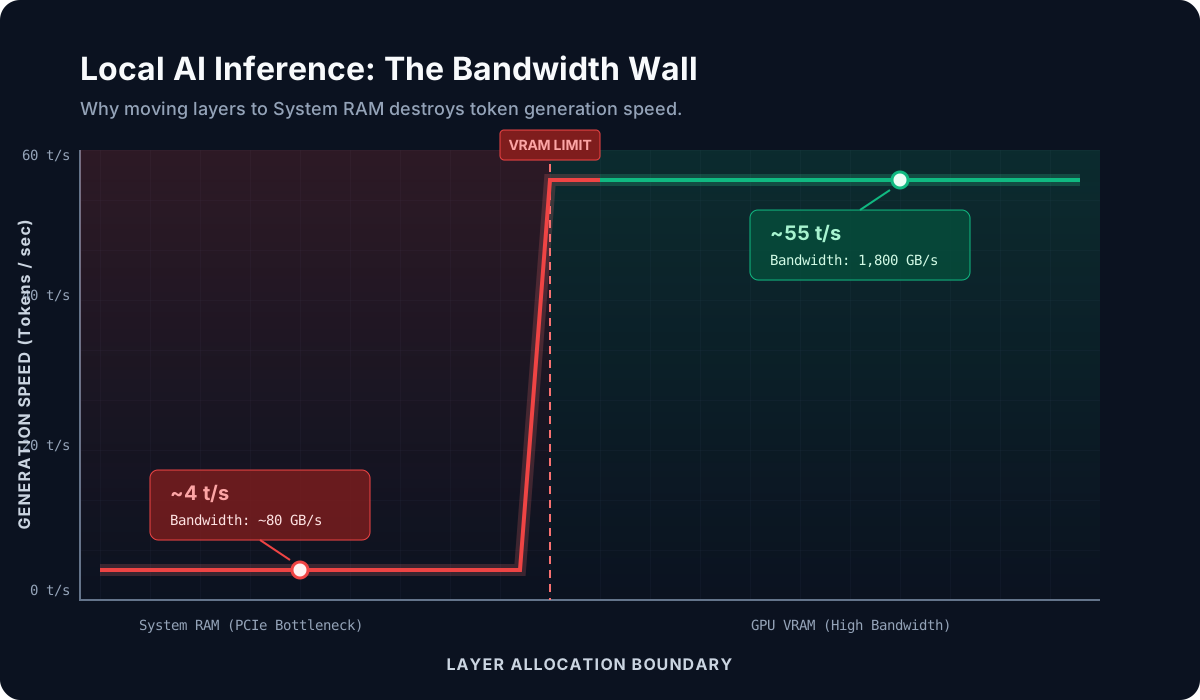
This diagram illustrates the bandwidth wall between GPU VRAM (green zone, ~1,800 GB/s) and system RAM (red zone, ~80 GB/s). Models that straddle both pay a 20-50x latency penalty.
Post-Specific Engineering Lens
For this post, the primary objective is: Optimize local inference under strict memory and latency budgets.
Implementation decisions for this case
- Prioritized bandwidth over model size
- Used KV cache quantization to extend context capacity
- Implemented hierarchical context folding for long sessions
Practical command path
# Check memory fit
free -h
cat /proc/meminfo | grep MemAvailable

# Launch with KV cache quantization
./llama-server --ctx-size 4096 --cache-type-k q4_0 --cache-type-v q4_0

# Monitor during inference
watch -n 1 'nvidia-smi || cat /proc/meminfo | head -5'
Validation Matrix
| Validation goal | What to baseline | What confirms success |
|---|---|---|
| Throughput | t/s baseline | t/s within target range |
| Memory stability | RSS at idle | RSS stays bounded during load |
| Context behavior | Empty context response | Full context response quality |
Failure Modes and Mitigations
| Failure mode | Why it appears | Mitigation |
|---|---|---|
| Layers in system RAM | Model too large for fast tier | Use smaller model or heavier quantization |
| KV cache OOM | Long context + no quantization | Enable q4 KV cache |
| Context overflow | No folding mechanism | Implement hierarchical folding |
| Thermal throttling | Sustained inference load | Monitor thermals, add cooling |
Recruiter-Readable Impact Summary
- Scope: Edge LLM deployment on ARM64 hardware
- Execution quality: Systematic optimization across memory, cache, and context
- Outcome signal: 26-53x throughput improvement, stable long-running sessions