Situation
The biggest mistake in local GPU inference is thinking in terms of capacity only:
“If the model loads, I’m done.”
That is the wrong mental model.
The real model is:
“If the hot path stays in the fastest memory tier, the model is useful. If it spills into a slower tier, performance can collapse.”
This post is the advanced version of that idea, focused on:
- VRAM budgeting
- CPU offload
- bandwidth cliffs
- quantized weights
- quantized KV cache
- Linux / Windows / WSL execution patterns
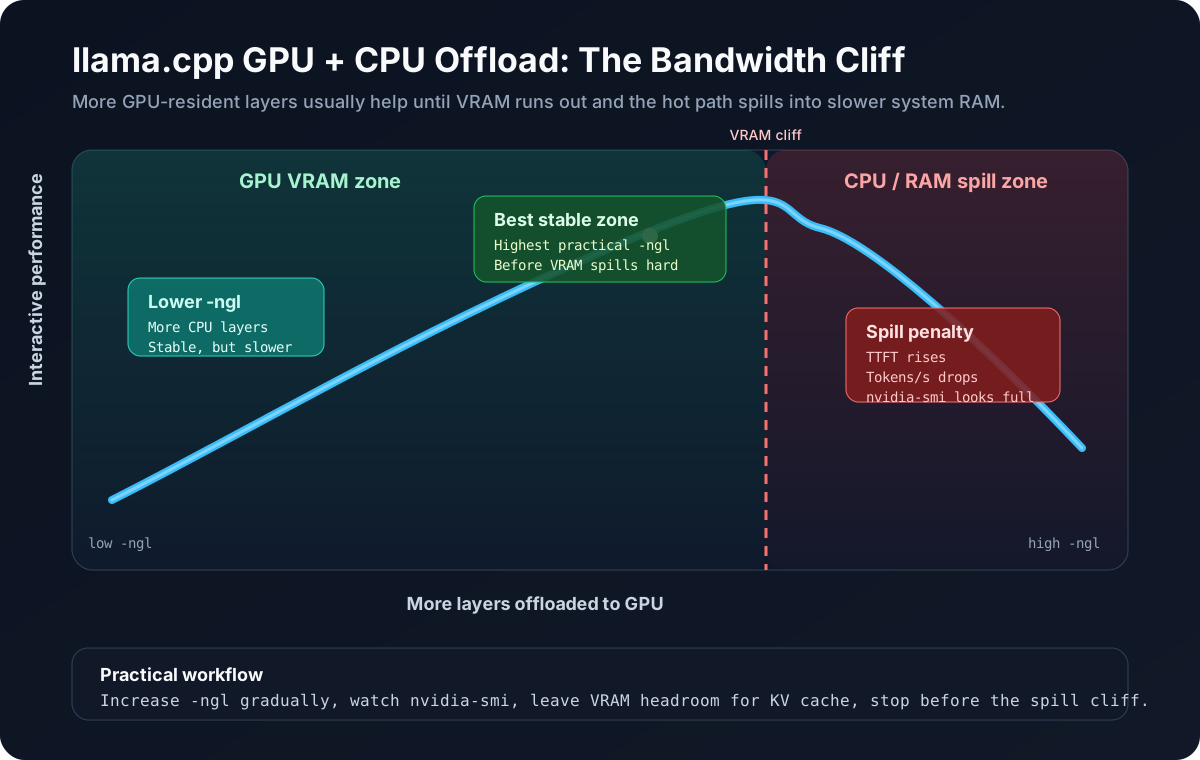
This diagram is intentionally simple: move more layers into VRAM until you approach the stable limit, then stop before the spill zone turns RAM traffic into your bottleneck.
The Bandwidth Wall
Why partial offload hurts so much
A GPU can execute matrix math extremely fast, but only if the next layers arrive fast enough. When part of the model sits in VRAM and the rest has to be pulled from system RAM, the GPU spends more time waiting on transfers.
That is the real performance cliff.
A simplified memory hierarchy:
| Memory tier | Approx bandwidth | What it means for inference |
|---|---|---|
| GPU VRAM | very high | ideal home for hot layers and KV activity |
| System RAM | much lower | acceptable for preload / support data, bad for hot inference path |
| Disk | unusable for hot path | only for load time |
The exact numbers vary by card and platform, but the operating principle does not:
- fully-in-VRAM models feel dramatically faster
- hybrid GPU+RAM models can still work
- once too much of the model lives in RAM, tokens/s and TTFT can drop hard
The Core Rule
Fit is not enough
If a 27B quantized model only fits by splitting across VRAM and RAM, it may still be worse interactively than a 7B, 9B, or 14B model that fits mostly inside VRAM.
That is why practical local inference is mostly a bandwidth optimization problem.
Weight Quantization vs KV Cache Quantization
These are related, but they are not the same thing.
Weight quantization
This reduces the precision of the model parameters themselves.
In rough terms, if full precision stores a weight as a higher-precision value, quantization stores an approximation:
w ≈ s * qWhere:
wis the original weightqis a low-bit integer codesis a scale factor used to reconstruct an approximate value
In grouped/block quantization, you usually have something closer to:
w_i ≈ s_block * q_ifor all weights i in a quantization block.
That is the intuition behind formats like:
Q4_K_MQ5_K_MQ8_0
The important operational point:
- lower-bit weight quantization reduces VRAM/RAM needs
- but can reduce model fidelity
- and some quant families preserve quality better than others at the same nominal bit width
KV cache quantization
This does not quantize the stored model weights. It quantizes the attention cache created during inference.
Conceptually, for each token the model stores key/value vectors across layers:
K_t, V_tAs context grows, those tensors grow too. KV cache quantization stores approximations of those tensors using lower precision:
K_t ≈ s_k * q_k
V_t ≈ s_v * q_v
The main value is:
- less memory per token of context
- more headroom for long prompts
- lower risk of OOM under concurrency
The tradeoff is possible quality degradation, especially at longer contexts or more demanding tasks.
What the common quant names mean
Weight quant formats
Practical mental model:
Q4_*: usually the best default when you need a strong size/performance tradeoffQ5_*: larger, often slightly better quality, may be worth it on bigger GPUsQ8_0: much heavier; useful when you want closer-to-higher-precision behavior and have enough memory
For llama.cpp local workstation use, Q4_K_M is often the best default recommendation because it is usually:
- small enough to fit
- high quality relative to its size
- broadly practical on consumer hardware
In practical terms, Q4-class weights are often the best middle ground:
- the memory savings versus heavier quants are large
- the quality loss is often small enough to be acceptable for real work
- and avoiding VRAM spill usually matters more than chasing a smaller theoretical quality gain with a heavier quant
That should still be read as a practical rule, not a law of physics. Some models hold up better than others under quantization, and some tasks are more sensitive than others.
KV cache formats
The main llama.cpp flags are:
-ctk f16
-ctv f16
or:
-ctk q8_0
-ctv q8_0
or:
-ctk q4_0
-ctv q4_0
Practical rule:
f16= safest baselineq8_0= balanced compromiseq4_0= aggressive memory-saving mode
Card-by-card thinking
RTX 3060 12 GB
This is one of the most interesting local-AI cards because it is affordable, but small enough that bad decisions show up quickly.
What it is good at
- small to medium quantized models that fit mostly in VRAM
- practical interactive use with sensible model sizes
- experimentation with larger models using partial offload
What to avoid
- assuming 27B is a good default just because it can be coerced to load
- running high context plus heavy offload plus high concurrency at once
Practical recommendation
On a 3060:
- prefer
Q4_K_Mfor bigger models - keep concurrency low
- treat
27Bhybrid offload as a deliberate quality-over-speed mode
Representative command:
./llama-server \
  -m /models/Qwen3.5-27B-Q4_K_M.gguf \
  --host 127.0.0.1 --port 8080 \
  -c 4096 -t 8 --parallel 1 --jinja \
  -ngl 28 \
  -ctk q8_0 -ctv q8_0 \
  -fa on
The exact -ngl depends on:
- the model family
- the quant
- the build
- the context size
- KV cache choice
- what else is already using VRAM
The honest expectation
When a 27B model is only partially on GPU:
- TTFT rises
- prompt processing slows sharply
- decode speed drops
- tokens/s can fall by multiple times compared with a smaller model that stays mostly in VRAM
So if the goal is fast interactive chat, a smaller model that fits well is usually the better engineering decision.
RTX 5070-class thinking
The exact consumer card variants and VRAM amounts differ, but the same rules apply:
- more VRAM gives you more room to keep hot layers on GPU
- faster memory reduces how much pain you feel before spillover
- CPU offload is still a tax, just a smaller one if less of the model spills
A stronger modern GPU shifts the breakpoints upward:
- larger models become practical
- bigger contexts become practical
- you may be able to keep a
14Bor even larger class model mostly on-device
But the wrong conclusion is still:
“VRAM got bigger, so bandwidth no longer matters.”
Bandwidth still matters. It just fails later.
Quick comparison: 3060 vs 5070-class vs full-VRAM fit
| Setup | What usually happens | Best use case |
|---|---|---|
| RTX 3060 12 GB + hybrid offload | Strong pressure to spill larger models into RAM; 27B is possible but clearly taxed | deliberate quality-over-speed experiments |
| 5070-class mid-range modern GPU | More room for larger models and higher context before the cliff | practical workstation inference with better latency headroom |
| Model fully or mostly inside VRAM | Best TTFT and tokens/s; GPU stays fed | interactive chat, coding, agent loops |
The pattern is simple:
- the closer you are to full VRAM residency, the better the experience
- the more you spill into RAM, the more you pay in TTFT and throughput
Q4_K_M vs Q5_K_M vs Q8_0
| Quant | Typical tradeoff | When to choose it |
|---|---|---|
Q4_K_M | best default size/quality balance | first choice for most local users |
Q5_K_M | more memory, often a modest quality gain | when the model still fits comfortably |
Q8_0 | much heavier, closer to higher precision | when you have abundant memory and care more about fidelity than fit |
Practical reading:
- if
Q5_K_Mcauses spill butQ4_K_Mfits,Q4_K_Mis usually the better real-world choice Q8_0can make sense for smaller models on bigger cards, but is often the wrong choice on constrained consumer setups
A practical VRAM budgeting formula
Do not budget only the GGUF file size. Play with the calculator below to see how context length and offloading affect the memory footprint.
Interactive VRAM Simulator
Estimates are approximateThe raw formula under the hood of the calculator is roughly:
total_vram_needed ≈ (weights_gb * offload_pct) + kv_cache_gb + runtime_overheadWhere:
offloaded_weight_bytesis the portion of the model actually placed on GPUkv_cache_bytesgrows with context length, layer count, and cache precisionruntime_overheadcovers allocator slack, CUDA buffers, graph memory, and general serving overhead
Practical rule:
- leave headroom
- do not try to fill VRAM to 100%
- if a model “barely fits,” assume it does not fit well enough for a stable interactive setup
What -ngl actually means
In llama.cpp, -ngl controls how many transformer layers you attempt to offload to the GPU.
Mental model:
- lower
-ngl= more layers stay on CPU/RAM - higher
-ngl= more layers move to GPU/VRAM -ngl 999is often used as shorthand for “offload as much as possible”
This is layer-based, not byte-based.
How to tune -ngl
Start simple:
- pick your model and quant
- start with a moderate
-ngl - watch VRAM usage and whether the model loads cleanly
- increase until you approach the memory cliff
- back off slightly and keep margin for KV cache and runtime overhead
For example:
- if
-ngl 40fails or causes unstable VRAM pressure - but
-ngl 28is stable - then
28is the better production number even if40looked better on paper
Each extra offloaded layer pushes more of the hot path into VRAM. That usually helps until you run out of headroom.
Monitor the right thing with nvidia-smi
nvidia-smi is not enough by itself, but it is still the fastest sanity check while tuning -ngl.
Typical workflow:
watch -n 1 nvidia-smiWhat to look for:
- VRAM usage climbing as
-nglincreases - whether the model load succeeds cleanly
- whether you still have headroom for KV cache and runtime overhead
If VRAM is effectively full and the experience still feels slow, you may already be beyond the practical point where more offload helps.
How to run a compiled llama.cpp build with GPU + CPU offload
Yes. This is exactly the point of the GPU/offload post.
The hybrid path is:
- build
llama.cppwith CUDA enabled - run
llama-serverorllama-cli - offload only as many layers as VRAM can support
- let the remaining layers live in system RAM
Linux CUDA build
git clone https://github.com/ggml-org/llama.cpp.git
cd llama.cpp
cmake -B build -DGGML_CUDA=ON
cmake --build build -j
Then run a hybrid-offload server:
./build/bin/llama-server \
  -m /models/Qwen3.5-27B-Q4_K_M.gguf \
  --host 127.0.0.1 --port 8080 \
  -c 4096 -t 8 --parallel 1 --jinja \
  -ngl 28 \
  -ctk q8_0 -ctv q8_0 \
  -fa on
Windows CUDA build
On Windows, the practical route is:
- install recent NVIDIA drivers
- install Visual Studio Build Tools
- install CUDA toolkit
- build
llama.cppwith CUDA enabled
Representative flow:
git clone https://github.com/ggml-org/llama.cpp.git
cd llama.cpp
cmake -B build -DGGML_CUDA=ON
cmake --build build --config Release
Then run:
.\build\bin\Release\llama-server.exe `
  -m D:\models\Qwen3.5-27B-Q4_K_M.gguf `
  --host 127.0.0.1 --port 8080 `
  -c 4096 -t 8 --parallel 1 --jinja `
  -ngl 28 `
  -ctk q8_0 -ctv q8_0 `
  -fa on
WSL setup guidance
Use WSL if you specifically want:
- Linux-style scripts
- Linux build steps
- easier parity with server environments
But WSL only makes sense if GPU passthrough is actually working.
Minimum checks:
nvidia-smi
./build/bin/llama-server --version
If nvidia-smi fails inside WSL, you are not running a real GPU inference path there.
Windows vs Linux vs WSL
| Option | Best when | Tradeoffs |
|---|---|---|
| Native Windows | you want the shortest path to a local desktop setup | build/tooling can be more Windows-specific |
| WSL2 | you want Linux-like scripts and closer parity with server environments | must verify GPU passthrough and avoid bad filesystem placement |
| Linux | you want the cleanest benchmarking and deployment workflow | requires a Linux host or dual-boot/server access |
Linux
Linux is still the cleanest path for llama.cpp workstation inference:
- easiest CUDA builds
- easier scripting and benchmarking
- lower environment ambiguity
Native Windows
Native Windows can work fine if you:
- use a good CUDA-enabled llama.cpp build
- keep drivers current
- avoid mixing too many runtime layers
Representative command:
.\llama-server.exe `
  -m D:\models\Qwen3.5-14B-Q4_K_M.gguf `
  --host 127.0.0.1 --port 8080 `
  -c 4096 -t 8 --parallel 1 --jinja `
  -ngl 999 `
  -ctk q8_0 -ctv q8_0 `
  -fa on
WSL
WSL is often the best compromise for Windows users who want a Linux-like workflow.
But it should be set up intentionally.
If you use WSL, do this properly
- use WSL2
- verify CUDA passthrough actually works
- verify the GPU is visible inside WSL before you benchmark
- keep model files on a performant filesystem path
- avoid cross-filesystem overhead for hot workflows when possible
Typical validation steps:
nvidia-smi
./llama-cli --help
./llama-server --version
If WSL GPU passthrough is not working, you are not benchmarking the setup you think you are benchmarking.
How to choose quantization in practice
Default recommendation
If someone asks for a single practical answer:
Start with
Q4_K_M.
Why:
- it is usually the best first compromise
- it keeps memory pressure down
- it is more likely to fit fully or mostly in VRAM
- it often delivers much better overall UX than a larger higher-quality quant that spills badly
When to move up
Try larger or heavier quants when:
- the model already fits comfortably
- you care more about quality than latency
- you have enough VRAM headroom for both weights and KV cache
When to quantize KV cache more aggressively
Use q8_0 or q4_0 KV cache when:
- context length is growing
- multiple sessions exist
- you are near the memory cliff
Practical sizing checklist
Before locking a model in:
- estimate weight footprint
- budget KV cache separately
- leave VRAM headroom for runtime overhead
- test TTFT, not just steady-state t/s
- test with realistic context, not toy prompts
- prefer the smaller model if the larger one spills too much
Failure modes
| Failure mode | What it looks like | What usually caused it |
|---|---|---|
| ”It loads but feels slow” | very high TTFT, weak decode speed | too much offload to system RAM |
| OOM at higher context | works at 2K, fails at 8K | KV cache budget ignored |
| GPU underutilized | low throughput despite CUDA | host-memory bottleneck or poor offload split |
| WSL confusion | inconsistent results | GPU passthrough or storage-path issues |
Architecture Diagram
This animated SVG shows the practical tuning story: increase -ngl, watch nvidia-smi, and stop at the highest stable GPU residency point before VRAM pressure turns hybrid offload into a RAM bottleneck.
Takeaway
The real local inference rule is simple:
A model that mostly fits in fast memory beats a larger model that technically loads through spillover.
That is why Q4_K_M is often the right default, why KV cache quantization matters, and why hybrid offload should be treated as a measured engineering tradeoff instead of a free upgrade.