Update (2026-08-04): This post documents the original SYCL crash fix from build b9853. The KV config has since been upgraded to q8_0 K + q4_1 V and the build advanced to b10222 (+6-13% improvement). For the current full recipe, see Intel Arc Pro B70: The Complete Local LLM Recipe. The SYCL_CACHE_PERSISTENT fix and libze-dev requirement below are still valid.
Situation
I wanted a clean answer to a very specific question:
Can a single Intel Arc Pro B70 32GB run Qwen3.6-35B-A3B through
llama.cppSYCL on Linux, with a reproducible configuration and useful throughput?
Vulkan already worked as a fallback, but that was not the goal. On Intel Arc, the more interesting path is SYCL + Level Zero: it is closer to Intel’s compute stack, it exposes the hardware through oneAPI, and it is the path where most Intel-specific LLM optimization work is landing.
The target setup was:
- source-built
llama.cpp - SYCL backend
- Level Zero device path
- Intel Arc Pro B70 32GB
- Qwen3.6-35B-A3B GGUF
- OpenAI-compatible local API
- no cloud dependency
The final result worked, but getting there was not just a matter of installing oneAPI and running the usual flags.
Hardware reference: Intel Arc Pro B70 on Amazon.
Final Result
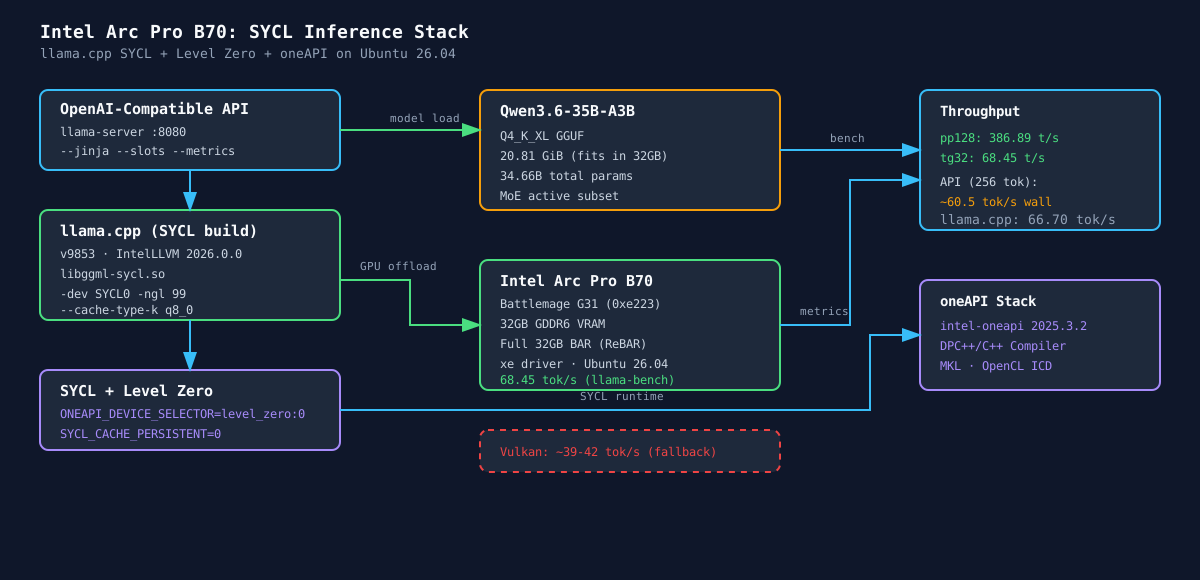
The working stack runs Qwen3.6-35B-A3B-UD-Q4_K_XL.gguf fully offloaded on a single B70.
Model:   Qwen3.6-35B-A3B-UD-Q4_K_XL.gguf
Size:    20.81 GiB
Params:  34.66B total, MoE active subset
Backend: llama.cpp SYCL / Level Zero
GPU:     Intel Arc Pro B70, Battlemage G31, 32GB VRAM
Context: 16K in the production server test
Synthetic llama-bench result:
Qwen3.6-35B-A3B Q4_K_XL, SYCL, -ngl 99
pp128: 386.89 t/s
tg32:   68.45 t/s
OpenAI-compatible API result, 256 generated tokens:
Prompt tokens: 35
Generated tokens: 256
Wall time: 4.229s
Approx wall-clock throughput: 60.54 tok/s
llama.cpp reported generation throughput: 66.70 tok/s
Small-model sanity test:
Ornith/Qwen-family 9B Q6_K, SYCL, -ngl 99
pp128: 1306.32 t/s
tg32:    60.73 t/s
That small-model run was useful because it separated “SYCL can execute kernels” from “the 35B model fits and performs well”.
Inference Stack
Hardware and OS
CPU:    AMD Ryzen 7 5700X3D
GPU:    Intel Arc Pro B70, Battlemage G31, PCI ID 8086:e223
VRAM:   32GB GDDR6
OS:     Ubuntu 26.04 LTS
Kernel: 7.0.0-27-generic
Driver: xe
GPU detection:
0b:00.0 VGA compatible controller [0300]: Intel Corporation Battlemage G31 [Intel Graphics] [8086:e223]
Kernel driver in use: xe
Kernel modules: xe
Resizable BAR / Above 4G decoding was confirmed working. The B70 exposes a full 32GB BAR:
Region 0: Memory at 2000000000 (64-bit, prefetchable) [size=16M]
Region 2: Memory at 1000000000 (64-bit, prefetchable) [size=32G]
This matters because one of the first assumptions with 32GB GPUs is that BAR mapping might be wrong. In this case, it was not. The full VRAM aperture was visible to the system.
Runtime Packages
The relevant package versions on the working host were:
intel-oneapi-compiler-dpcpp-cpp          2026.0.0-947
intel-oneapi-base-toolkit                2025.3.2-19
intel-opencl-icd                         26.05.37020.3-1
intel-ocloc                              26.05.37020.3-1
libze-intel-gpu1                         26.05.37020.3-1
libze1                                   1.28.2-2
libze-dev                                1.28.2-2
libigdgmm12                              22.9.0+ds1-1
libigc2                                  2.28.4-4
The key package I initially missed was:
sudo apt-get install -y libze-devWithout libze-dev, CMake found SYCL but did not fully enable the Level Zero API path:
GGML_SYCL_SUPPORT_LEVEL_ZERO_API ON
Level Zero loader or headers not found, Level Zero support disabled
After installing libze-dev, the configure step changed to:
GGML_SYCL_SUPPORT_LEVEL_ZERO_API ON
Level Zero loader found: /usr/lib/x86_64-linux-gnu/libze_loader.so
Level Zero headers found: /usr/include
That did not fix the crash by itself, but it made the build match the intended backend path.
Device Enumeration
After sourcing oneAPI:
source /opt/intel/oneapi/setvars.sh --force
sycl-ls
Relevant output:
[level_zero:gpu][level_zero:0] Intel(R) oneAPI Unified Runtime over Level-Zero V2, Intel(R) Graphics [0xe223] 20.2.0 [1.14.37020]
[opencl:gpu][opencl:1] Intel(R) OpenCL Graphics, Intel(R) Graphics [0xe223] OpenCL 3.0 NEO [26.05.037020]
I used the exact Level Zero selector in the runtime environment:
export ONEAPI_DEVICE_SELECTOR=level_zero:0Leaving selection to defaults also worked in simple tests, but explicit selection avoids ambiguity on machines with multiple GPUs or CPU OpenCL devices.
Building llama.cpp
Working llama.cpp version:
version: 9853 (7af4279f4)
built with IntelLLVM 2026.0.0 for Linux x86_64
Build commands:
git clone https://github.com/ggml-org/llama.cpp.git
cd llama.cpp

git fetch origin master --tags
git checkout -B b70-sycl-test origin/master

source /opt/intel/oneapi/setvars.sh --force

rm -rf build-sycl-b70
cmake -B build-sycl-b70 \
  -DGGML_SYCL=ON \
  -DCMAKE_C_COMPILER=icx \
  -DCMAKE_CXX_COMPILER=icpx \
  -DCMAKE_BUILD_TYPE=Release \
  -DGGML_SYCL_F16=ON \
  -DCMAKE_PREFIX_PATH=/opt/intel/oneapi/mkl/latest/lib/cmake

cmake --build build-sycl-b70 --config Release -j$(nproc)
I did not use AOT architecture targeting in the final working build. This is a normal SYCL build using runtime JIT.
That was intentional. Some Battlemage AOT paths are still moving quickly upstream, and the goal here was a reproducible working baseline before chasing extra performance.
The Actual Failure
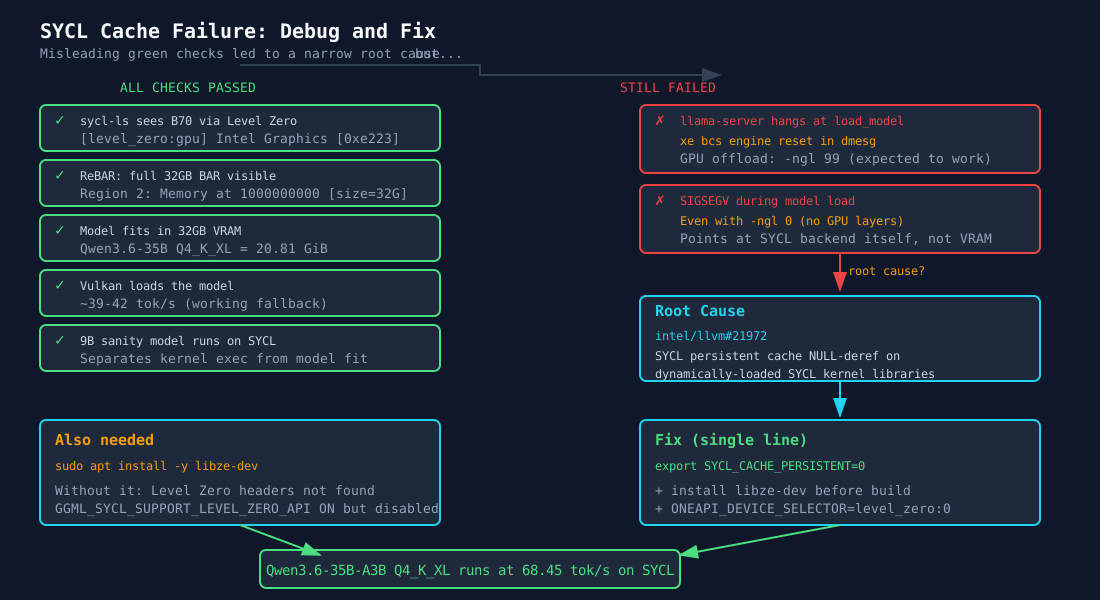
The confusing part was that every obvious check passed:
- the GPU was visible through
sycl-ls - Level Zero saw the B70
- ReBAR exposed the full 32GB BAR
- the model fit in VRAM
- Vulkan could load the same model
- smaller models were available for sanity checks
Still, SYCL failed in two ways during debugging:
llama-serverhung atload_model, with xebcsengine reset messages indmesg- later, after reducing some variables, the SYCL build segfaulted during model load even with
-ngl 0
The -ngl 0 failure was the important clue. If a SYCL build crashes while loading a model with no GPU layers offloaded, the issue is not simply “the model is too big” or “the GPU upload is too large”. It points at the SYCL backend/runtime path itself.
The Actual Fix
The critical runtime variable was:
export SYCL_CACHE_PERSISTENT=0With persistent SYCL cache enabled, the process segfaulted during model load. With persistent cache disabled, the same build, same model, and same GPU worked.
The matching upstream issue is:
intel/llvm#21972
[SYCL] NULL-deref in getSortedImages comparator on dynamically-linked SYCL kernel libraries
The relevant failure class is a NULL dereference in the SYCL persistent device code cache path when using dynamically loaded SYCL kernel libraries. llama.cpp loads libggml-sycl.so, which makes that issue directly relevant.
The workaround from the issue matched the local fix exactly:
SYCL_CACHE_PERSISTENT=0This was the turning point. After that, both the 9B sanity model and the 35B MoE model loaded and executed on SYCL.
Minimal Working Environment

This is the environment I would start with before adding any performance tuning:
source /opt/intel/oneapi/setvars.sh --force
export ONEAPI_DEVICE_SELECTOR=level_zero:0
export ZES_ENABLE_SYSMAN=1
export SYCL_CACHE_PERSISTENT=0
That is intentionally small.
Several community flags were either unnecessary or actively harmful on this exact stack.
Runtime Flags
Working server flags:
llama-server \
  -m /models/Qwen3.6-35B-A3B-UD-Q4_K_XL.gguf \
  --host 0.0.0.0 \
  --port 8080 \
  -dev SYCL0 \
  -ngl 99 \
  -c 16384 \
  --parallel 1 \
  --no-mmap \
  --flash-attn off \
  --cache-type-k q8_0 \
  --reasoning off \
  --metrics \
  --slots \
  --jinja
Why these flags:
-dev SYCL0-> target the B70 explicitly-ngl 99-> offload all possible layers-c 16384-> stable initial context for the production server test--parallel 1-> baseline single-slot run before concurrency tuning--no-mmap-> avoids mmap-related ambiguity while debugging model load--flash-attn off-> stable baseline; SYCL flash attention is still model/build-dependent--cache-type-k q8_0-> reduces KV memory without the quality hit of aggressive q4 KV--reasoning off-> keeps OpenAI chat responses inmessage.contentinstead of separating thinking intoreasoning_content--metrics-> exposes throughput metrics for measurement
Working Launcher
This is a public-safe launcher template. Adjust paths for your own machine.
#!/bin/bash
set -e

set +u
source /opt/intel/oneapi/setvars.sh --force >/dev/null 2>&1
set -u

export ONEAPI_DEVICE_SELECTOR=level_zero:0
export ZES_ENABLE_SYSMAN=1
export SYCL_CACHE_PERSISTENT=0

# These broke device enumeration on this tested stack.
unset ZEX_NUMBER_OF_CCS SYCL_UR_USE_LEVEL_ZERO_V2

exec /opt/llama.cpp/build-sycl-b70/bin/llama-server \
  -m /models/Qwen3.6-35B-A3B-UD-Q4_K_XL.gguf \
  --host 0.0.0.0 \
  --port 8080 \
  --api-key "replace-with-your-key" \
  -dev SYCL0 \
  -ngl 99 \
  -c 16384 \
  --parallel 1 \
  --no-mmap \
  --flash-attn off \
  --cache-type-k q8_0 \
  --reasoning off \
  --metrics \
  --slots \
  --jinja
systemd Service
[Unit]
Description=llama.cpp inference server (Intel Arc Pro B70 SYCL)
After=network.target

[Service]
Type=simple
User=inference
WorkingDirectory=/opt/inference
ExecStart=/opt/inference/launch-b70-sycl.sh
Restart=on-failure
RestartSec=30
TimeoutStartSec=600
TimeoutStopSec=30

[Install]
WantedBy=multi-user.target
Enable it:
sudo systemctl daemon-reload
sudo systemctl enable llama-b70.service
sudo systemctl start llama-b70.service
API Verification
Health endpoint:
curl -s http://127.0.0.1:8080/healthExpected:
{ "status": "ok" }OpenAI-compatible chat test:
curl -s http://127.0.0.1:8080/v1/chat/completions \
  -H 'Content-Type: application/json' \
  -H 'Authorization: Bearer replace-with-your-key' \
  -d '{
    "model": "b70-sycl-qwen",
    "messages": [
      {"role": "user", "content": "Answer with exactly this word: OK"}
    ],
    "max_tokens": 16,
    "temperature": 0,
    "stream": false
  }'
Verified response content:
OKBenchmarks
Ornith 35B Sanity Test
source /opt/intel/oneapi/setvars.sh --force
export ONEAPI_DEVICE_SELECTOR=level_zero:0
export ZES_ENABLE_SYSMAN=1
export SYCL_CACHE_PERSISTENT=0

./build-sycl-b70/bin/llama-bench \
  -m /models/ornith-1.0-35b-Q5_K_M.gguf \
  -ngl 99 \
  -p 128 \
  -n 32 \
  -r 1 \
  -o md
Result:
ornith 35B Q5_K_M, SYCL, -ngl 99
pp128: 441.0 t/s
tg32:    74.3 t/s
Qwen3.6-35B-A3B
source /opt/intel/oneapi/setvars.sh --force
export ONEAPI_DEVICE_SELECTOR=level_zero:0
export ZES_ENABLE_SYSMAN=1
export SYCL_CACHE_PERSISTENT=0

./build-sycl-b70/bin/llama-bench \
  -m /models/Qwen3.6-35B-A3B-UD-Q4_K_XL.gguf \
  -ngl 99 \
  -p 128 \
  -n 32 \
  -r 1 \
  -o md
Result:
qwen35moe 35B.A3B Q4_K - Medium, SYCL, -ngl 99
pp128: 386.89 t/s
tg32:   68.45 t/s
API Timing Test
A 256-token API generation returned:
Prompt tokens: 35
Generated tokens: 256
Wall time: 4.229s
Approx wall-clock throughput: 60.54 tok/s
llama.cpp predicted_per_second: 66.70 tok/s
Metrics endpoint sample:
llamacpp:prompt_tokens_seconds     106.509
llamacpp:predicted_tokens_seconds   61.6635
The API path is slower than a synthetic llama-bench row because it includes chat templating, HTTP overhead, and real server scheduling.
Temperature Snapshot
After a short API test, hwmon sensors were in this range:
Most sensors: 50-56°C
Highest sampled sensor: 59°C
This was not a long thermal soak. It is just a sanity check that the card was not immediately running into a thermal wall.
What Did Not Work
Treating Vulkan as the answer
Vulkan loaded the model and generated around 39-42 tok/s in early tests. That was useful for keeping the system usable, but it was not the backend I wanted to end on.
The SYCL result is both faster and more relevant to Intel’s compute stack:
Vulkan API test: ~39-42 tok/s
SYCL API test:   ~60 tok/s wall-clock, ~66 tok/s reported generation
SYCL bench:      68.45 tok/s on tg32
Keeping persistent SYCL cache enabled
This was the main failure.
Bad:
export SYCL_CACHE_PERSISTENT=1Good:
export SYCL_CACHE_PERSISTENT=0Missing Level Zero development headers
Runtime packages alone were not enough for a clean llama.cpp SYCL build with Level Zero API support.
Fix:
sudo apt-get install -y libze-devOver-applying community environment variables
These were not valid on this tested stack:
export ZEX_NUMBER_OF_CCS=0:4
export ZEX_NUMBER_OF_CCS=0:8
export SYCL_UR_USE_LEVEL_ZERO_V2=0
Both caused device enumeration problems in testing. The final launcher unsets them.
Blaming ReBAR
ReBAR was fine. The full 32GB BAR was visible. This was not the cause.
Useful Upstream Issues
These were the references that actually helped:
intel/llvm#21972
SYCL persistent cache NULL-deref with dynamically loaded SYCL kernel libraries

intel/llm-scaler#426
Intel recommendation to use upstream llama.cpp SYCL for Qwen3.5/Qwen3.6 on B70

ggml-org/llama.cpp#24810
SYCL server behavior after xe engine reset / device loss

ggml-org/llama.cpp#21597
Level Zero allocation path for Intel multi-GPU memory behavior

ggml-org/llama.cpp#22413
Battlemage SYCL performance discussion and real B70 benchmark data

intel/compute-runtime#922
BMG-G31 / Level Zero runtime issues across compute-runtime versions
The most important one for this build was intel/llvm#21972.
Repro Checklist
For another B70 host, I would reproduce it in this order:
- Confirm the full 32GB BAR is visible.
lspci -vv -s <GPU_BUS_ID> | grep -E 'Region 0|Region 2'- Install the required runtime and development packages.
sudo apt-get install -y \
  intel-opencl-icd \
  libze1 \
  libze-intel-gpu1 \
  libze-dev \
  intel-ocloc \
  intel-oneapi-base-toolkit \
  cmake \
  git \
build-essential- Verify SYCL sees the card.
source /opt/intel/oneapi/setvars.sh --force
sycl-ls- Build
llama.cppwith SYCL.
cmake -B build-sycl-b70 \
  -DGGML_SYCL=ON \
  -DCMAKE_C_COMPILER=icx \
  -DCMAKE_CXX_COMPILER=icpx \
  -DCMAKE_BUILD_TYPE=Release \
  -DGGML_SYCL_F16=ON \
  -DCMAKE_PREFIX_PATH=/opt/intel/oneapi/mkl/latest/lib/cmake

cmake --build build-sycl-b70 --config Release -j$(nproc)- Run the minimal benchmark with persistent cache disabled.
source /opt/intel/oneapi/setvars.sh --force
export ONEAPI_DEVICE_SELECTOR=level_zero:0
export ZES_ENABLE_SYSMAN=1
export SYCL_CACHE_PERSISTENT=0

./build-sycl-b70/bin/llama-bench \
  -m /models/model.gguf \
  -ngl 99 \
  -p 128 \
  -n 32 \
  -r 1 \
-o md- Only then move to a server.
Takeaway
The failure mode was misleading because most of the hardware and driver checks looked healthy. The B70 was visible, Level Zero enumerated, ReBAR was correct, and the model fit in VRAM.
The fix was narrower:
- install the Level Zero development headers before building
- rebuild
llama.cppcleanly - disable persistent SYCL cache
- keep the environment small
- verify with
llama-benchbefore starting a server
Once that was done, the B70 moved from “Vulkan fallback works” to a proper SYCL inference setup running a 35B MoE model at around 60-68 tok/s.