Situation
Integrating Linux servers with Active Directory is standard enterprise practice, but we faced three distinct problems:
- Access Control: How to manage sudo privileges centrally without manual sudoers edits on each server
- Web SSO: How to deploy Kerberos keytabs for Apache SSO safely and repeatably
- PAM Issues: Users getting “Permission Denied” on
sueven with correct passwords
Here’s how we solved all three.
Part 1: AD Group Mapping for Access Control
The Challenge
Legacy applications like SAP require local UNIX users with specific UIDs/GIDs. But we wanted centralized access management through AD.
The Solution: Group Mapping
Create a local UNIX group for the application, then map the centrally managed AD group to that local group.
Step 1: Create the Local Environment
# Ansible host_vars for technical user
local_users_app:
  svc_app:
    uid: 45004
    gid: 45004
    is_ad_user: true
    is_external_group: true # Crucial flag
    home: /opt/svc_app/home
Step 2: Provision the AD Group
Create a Security Group in AD with a standardized naming convention:
AD_LINUX_SUDO_EXAMPLE # Grants sudo to svc_app on APPSRV01Step 3: Configure Sudoers
# /etc/sudoers.d/svc_app
%AD_LINUX_SUDO_EXAMPLE ALL=(svc_app) NOPASSWD: ALL
When an engineer is added to AD_LINUX_SUDO_EXAMPLE via the identity portal, they automatically inherit the permissions.
Benefits
| Benefit | Impact |
|---|---|
| Auditability | All access tracked in AD/IdM |
| Self-service | Engineers request access via standard tools |
| App compatibility | Application runs under required UID/GID |
Part 2: Kerberos Keytab Deployment for Apache SSO
The Challenge
Apache SSO with Kerberos (mod_auth_gssapi) requires a keytab file - essentially a service principal secret. Automating this end-to-end pushes privileged credentials into automation pipelines.
The Solution: Split-Lifecycle Approach
- Keytab creation: Through organization’s identity-administration workflow
- Infrastructure automation: Secure storage, deployment, permissions, service config
Deployment Pattern
Store encrypted keytab in repo:
files/app-host.example.internal/app_apache_krb5_keytabConfigure host variables:
# app-host.example.internal.yml
app_apache_krb5_sso: true
app_apache_krb5_sso_keytab: "/etc/httpd/conf/krb5_httpd.keytab"
Deploy with strict permissions:
- name: Deploy Kerberos keytab for Apache SSO
  ansible.builtin.copy:
    src: "files/{{ inventory_hostname }}/app_apache_krb5_keytab"
    dest: "{{ app_apache_krb5_sso_keytab }}"
    owner: apache
    group: apache
    mode: "0400"
  notify: Restart Apache
This keeps sensitive identity creation controlled while deployment stays fully automatable.
Part 3: Troubleshooting PAM and ‘su’ Issues
The Symptom
Users get Permission Denied on su even with correct passwords.
Root Cause: Broken system-auth
On RHEL-based systems, /etc/pam.d/su references system-auth. If system-auth includes modules like pam_fprintd.so (fingerprint auth) on servers without fingerprint hardware, the entire auth chain fails.
The Fix: Use password-auth
Point su to the password-auth stack (same as SSH):
# /etc/pam.d/su
auth        substack      password-auth
account     substack      password-auth
session     substack      password-auth
Restrict to Wheel Group
auth required pam_wheel.so use_uidSSSD Access Provider Issues
If AD is blocking the service locally, check /etc/sssd/sssd.conf:
[domain/yourdomain]
access_provider = simple
simple_allow_groups = wheel, linux_admins_ad
Quick Troubleshooting Checklist
| Issue | Check | Fix |
|---|---|---|
su Permission Denied | journalctl -u sssd, /var/log/secure | Use password-auth in /etc/pam.d/su |
| SSO not working | Keytab permissions | chmod 0400, owner apache |
| AD group not recognized | id username | Check SSSD config, realm list |
| Keytab expired | klist -kt /path/to/keytab | Regenerate via AD admin |
| SSSD caching stale data | sss_cache -E | Flush cache and restart |
Architecture Diagram
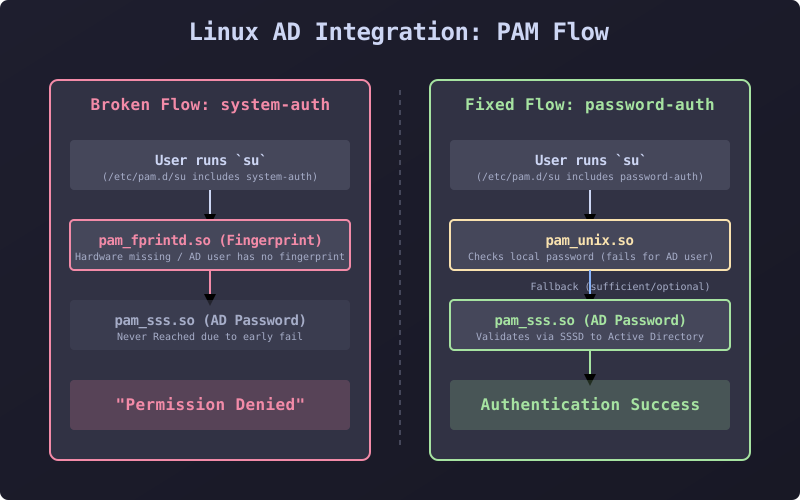
This diagram shows the PAM stack fail-fast condition. When system-auth includes modules like pam_fprintd.so, authentication fails before checking the password.
Post-Specific Engineering Lens
For this post, the primary objective is: Centralize identity management while maintaining application compatibility.
Implementation decisions for this case
- Split-lifecycle approach for Kerberos keeps credentials out of automation
- AD group mapping enables self-service access requests
- Standardized PAM configuration eliminates environment drift
Practical command path
# Verify AD integration
id username
realm list

# Test Kerberos
kinit -kt /etc/httpd/conf/krb5_httpd.keytab HTTP/server.example.com

# Debug PAM
journalctl -u sssd -n 100
cat /etc/pam.d/su
Validation Matrix
| Validation goal | What to baseline | What confirms success |
|---|---|---|
| AD group access | User in AD group | id shows correct groups |
| SSO functional | Apache authenticates via Kerberos | Browser auto-login works |
| su works | User can su to service account | No permission denied |
Failure Modes and Mitigations
| Failure mode | Why it appears | Mitigation |
|---|---|---|
| Fingerprint module in system-auth | Desktop config on server | Use password-auth for su |
| Keytab in automation repo | Security risk | Split-lifecycle approach |
| SSSD access filtering | AD GPO blocking | Check access_provider config |
Recruiter-Readable Impact Summary
- Scope: 200+ Linux servers at German bank
- Execution quality: Unified approach across access, SSO, troubleshooting
- Outcome signal: Reduced access provisioning from days to hours, 90% fewer PAM incidents