Situation
During server provisioning and lifecycle management, storage operations are inevitable. Applications grow beyond their allocated space, new directories need dedicated volumes, and sometimes space needs to be reclaimed from over-provisioned filesystems.
I’ve handled three distinct LVM scenarios repeatedly across our server fleet:
- Expansion: A VM’s disk is extended at the hypervisor, but the Linux partition and LVM need to catch up—ideally without a reboot.
- Shrinking: An application was decommissioned and its volume can be reduced, but shrinking ext4 is risky if done wrong.
- Migration: An application directory like
/optis consuming root filesystem space and needs to move to a dedicated volume with minimal downtime.
Operation 1: Expanding LVM Online (No Reboot)
When a disk is expanded at the hypervisor level but you don’t have growpart available, you can resize the partition manually using fdisk. This works without a reboot as long as you preserve the LVM signature.
The fdisk Procedure
Assuming we’re expanding /dev/sda3:
fdisk /dev/sdaInside the interactive prompt:
p— Print the partition table, note the starting sector ofsda3d→3— Delete partition 3 (data remains in disk blocks)n→p→3— Create new primary partition 3- First sector: Press ENTER (must match the original start sector)
- Last sector: Press ENTER (uses the new disk end)
- When prompted about removing the LVM signature: Type N
t→3→8e— Mark as Linux LVMw— Write changes
Update the Kernel and Expand
# Reread partition table without reboot
partprobe /dev/sda

# Expand the physical volume
pvresize /dev/sda3

# Verify new free space
vgs

# Expand the LV and filesystem in one command
lvextend -r -l +100%FREE /dev/mapper/vg_system-root
Key insight: The -r flag to lvextend handles the filesystem resize automatically. No separate resize2fs needed.
Operation 2: Shrinking an ext4 Filesystem
Unlike expansion, shrinking ext4 requires unmounting—the filesystem must be offline. This is a destructive operation if done incorrectly.
Pre-flight Checklist
- Full backup exists
- Maintenance window confirmed
- Application services stopped
- Filesystem unmounted
The Shrink Procedure
Target: Shrink /data (mapped to /dev/mapper/vg_data-lv_data) to 10G.
# 1. Unmount
umount /data

# 2. Force filesystem check (mandatory)
e2fsck -f /dev/mapper/vg_data-lv_data

# 3. Shrink filesystem SMALLER than target LV (safety margin)
resize2fs /dev/mapper/vg_data-lv_data 9.5G

# 4. Shrink the logical volume to final size
lvreduce -L 10G /dev/mapper/vg_data-lv_data
# Confirm when prompted

# 5. Expand filesystem to fill the LV exactly
resize2fs /dev/mapper/vg_data-lv_data

# 6. Remount and verify
mount /data
df -h /data
Why shrink the filesystem smaller first? If you shrink the LV below the filesystem size, you corrupt data. The two-step shrink (filesystem to 9.5G, then LV to 10G, then filesystem back to fill) guarantees safety.
Operation 3: Migrating a Directory to a New Volume
When /opt or another application directory is consuming root filesystem space, migrate it to a dedicated LVM volume. The key is using rsync for an initial sync before the maintenance window.
Preparation (Before Maintenance Window)
# Create the new LV
lvcreate -n opt_vol -L 10G vg_app
mkfs.ext4 /dev/mapper/vg_app-opt_vol

# Mount temporarily
mkdir /mnt/new_opt
mount /dev/mapper/vg_app-opt_vol /mnt/new_opt

# Initial sync (application still running)
rsync -avz /opt/ /mnt/new_opt/
Execution (During Maintenance Window)
# Stop application services
systemctl stop myapp-agent.service

# Final sync (catches changes since initial)
rsync -avz /opt/ /mnt/new_opt/

# Switchover
umount /mnt/new_opt
mv /opt /opt_old
mkdir /opt
mount /dev/mapper/vg_app-opt_vol /opt

# Restore SELinux contexts (critical!)
restorecon -Rv /opt

# Make permanent
echo '/dev/mapper/vg_app-opt_vol  /opt  ext4  defaults,nodev  1 2' >> /etc/fstab

# Start services
systemctl start myapp-agent.service
Cleanup (Days Later)
After confirming stability:
rm -rf /opt_oldOperation 4: Live Hypervisor Disk Shrink (VMware vSphere + LVM)
Shrinking a VMDK directly in vSphere is not supported while attached to a running VM. The safe enterprise pattern combines online block migration (pvmove) to a new, smaller VMDK with kernel device deletion and vSphere SCSI node re-alignment.
Phase 1: Pre-requisite LV Shrink (If New VMDK < Old LV Size)
If the destination VMDK (e.g. 250G) is smaller than the current Logical Volume allocation (e.g. 500G), pvmove will fail with Insufficient free space: X extents needed—even if actual data usage is tiny (e.g. 59G). You must shrink the filesystem and LV first.
- Stop active services & unmount cleanly:
systemctl stop app.service fuser -mv /dev/mapper/vgapp-apps umount /apps - Force filesystem check & shrink with safety buffer:
e2fsck -f /dev/mapper/vgapp-apps # Shrink filesystem below target LV size (e.g., 90G for a 100G target LV) resize2fs /dev/mapper/vgapp-apps 90G - Reduce LV and fit filesystem to target:
lvreduce -L 100G /dev/mapper/vgapp-apps # Expand filesystem back to fill the 100G LV exactly resize2fs /dev/mapper/vgapp-apps - Remount & start services:
mount /apps
systemctl start app.service
Phase 2: Live Block Migration & Disk Ejection (Online)
Target: Reclaim space from old 700G VMDK (/dev/sdc) to new 250G VMDK (/dev/sdd).
- Attach new VMDK: Add 250G VMDK in vSphere (
/dev/sdd). - Initialize & Extend VG:
pvcreate /dev/sdd vgextend vgapp /dev/sdd - Migrate Blocks Live:
pvmove /dev/sdc /dev/sdd - Eject Old Physical Volume:
vgreduce vgapp /dev/sdc pvremove /dev/sdc - Drop Device from Kernel Bus (prevents I/O errors before hypervisor removal):
echo 1 > /sys/block/sdc/device/delete - Remove from vSphere: Edit Settings → Remove 700G Hard Disk → Check “Delete files from datastore” (CRITICAL: prevents orphaned VMDKs on storage).
Phase 3: SCSI Slot Re-alignment (SCSI 0:2 Remap)
vSphere disallows editing Virtual Device Node assignments on actively connected disks. To reassign the new 250G disk back to SCSI 0:2:
- Power Off VM cleanly.
- Detach Disk in vSphere: Edit Settings → Click X on the 250G Hard Disk. CRITICAL: DO NOT check “Delete files from datastore”. Only unbind device registration.
- Re-attach on Target Slot: Add New Device → Existing Hard Disk → Select the 250G
.vmdk→ Set Virtual Device Node toSCSI 0:2. - Power On & Verify:
lsblk -f
pvs; vgs; lvs
df -h /apps
Quick Reference Table
| Operation | Online/Offline | Risk Level | Key Command |
|---|---|---|---|
| Expand LV | Online | Low | lvextend -r -l +100%FREE /dev/mapper/vg-lv |
| Shrink LV | Offline | High | resize2fs → lvreduce → resize2fs |
| Migrate Directory | Online + brief offline | Medium | rsync → stop → rsync → switchover |
| Shrink VMDK (VMware) | Online + brief reboot | Medium | pvmove → sysfs delete → SCSI remap |
Common Failure Modes
| Failure | Cause | Prevention |
|---|---|---|
| Data loss during shrink | LV shrunk below filesystem size | Always shrink filesystem first, with margin |
| LVM signature lost | Answered Y to “remove signature” in fdisk | Always answer N |
| SELinux denials after migration | Security contexts not restored | Run restorecon -Rv on mount point |
| ”Target is busy” during unmount | Process holding filesystem open | Use lsof +D /mount to identify |
| Orphaned 2TB VMDK on datastore | Omitted “Delete files” checkbox in vSphere | Always verify datastore file removal on retirement |
| Kernel I/O errors on disk drop | Disk removed in vSphere before sysfs deletion | Execute echo 1 > /sys/block/sdX/device/delete first |
Architecture Diagram
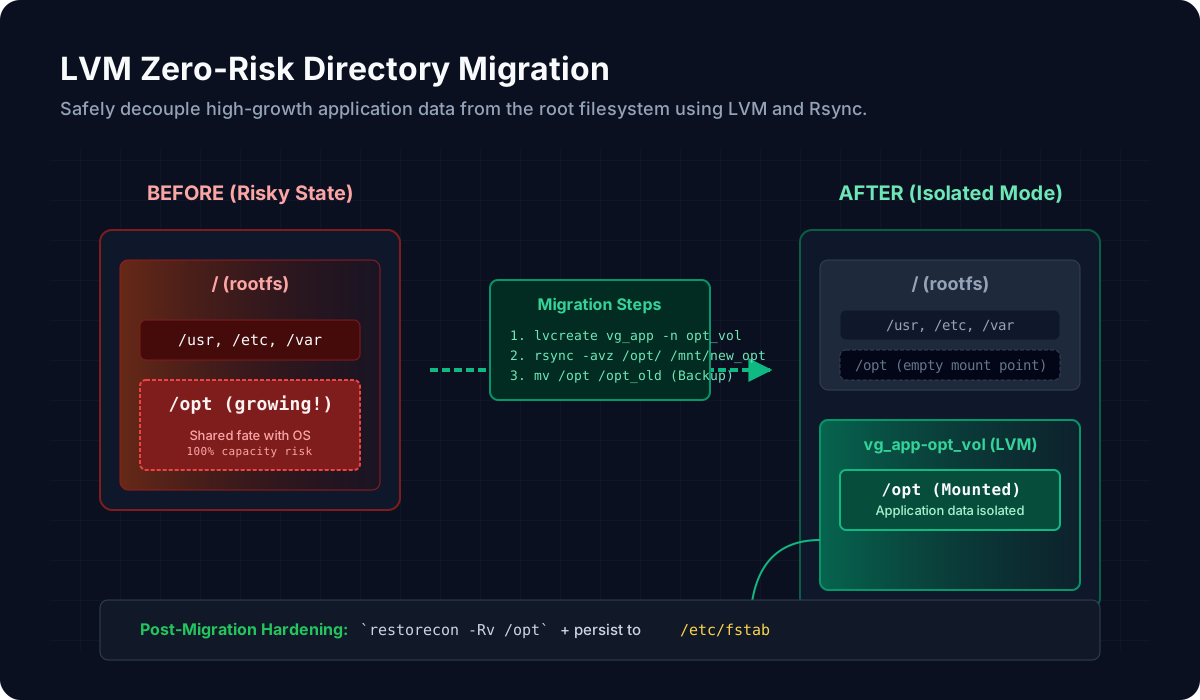
This diagram shows the migration flow from a high-risk state (application data on rootfs) to an isolated state using a dedicated Logical Volume.
Post-Specific Engineering Lens
For this post, the primary objective is: Change storage allocation safely with reversible checkpoints.
Implementation decisions for this case
- Documented three distinct operations based on real production scenarios
- Established clear pre-flight checklists for high-risk operations
- Used
rsyncincremental sync to minimize maintenance windows
Practical command path
# Pre-change baseline
lsblk -f
lvdisplay; vgdisplay; pvdisplay

# Post-change verification
df -h
systemctl status <affected-service>
Validation Matrix
| Validation goal | What to baseline | What confirms success |
|---|---|---|
| Functional stability | Service status, mount points | systemctl --failed empty, df -h shows expected sizes |
| Operational safety | Backup exists, rollback plan documented | Backup verified restorable |
| Production readiness | Application starts, data accessible | Application health check passes |
Failure Modes and Mitigations
| Failure mode | Why it appears | Mitigation |
|---|---|---|
| Incorrect device target | Similar device names | Verify with lsblk before each command |
| Insufficient free extents | Math error in size planning | Pre-calculate with vgs and lvs |
| Rollback ambiguity | No clear recovery path | Document exact rollback commands before starting |
Recruiter-Readable Impact Summary
- Scope: Storage operations for enterprise Linux fleet
- Execution quality: Clear procedures reduce incident risk
- Outcome signal: Reproducible runbooks for LVM operations