NFS Architecture Diagram
<svg viewBox="0 0 900 650" xmlns="http://www.w3.org/2000/svg">
  <!-- Background -->
  <rect width="900" height="650" fill="#f8fafc"/>

  <!-- Title -->
  <text x="450" y="35" text-anchor="middle" font-family="Arial" font-size="18" font-weight="bold" fill="#1e293b">
    Enterprise NFS Infrastructure Architecture
  </text>

  <!-- Network Segmentation Box -->
  <rect x="30" y="60" width="840" height="280" rx="8" fill="#e0f2fe" opacity="0.5" stroke="#0284c7" stroke-width="2" stroke-dasharray="5,5"/>
  <text x="450" y="80" text-anchor="middle" font-family="Arial" font-size="12" font-weight="bold" fill="#0369a1">Network Segmentation Layer</text>

  <!-- NFS Server -->
  <g transform="translate(80, 100)">
    <rect x="0" y="0" width="200" height="180" rx="8" fill="#dbeafe" stroke="#1e40af" stroke-width="2"/>
    <text x="100" y="25" text-anchor="middle" font-family="Arial" font-size="14" font-weight="bold" fill="#1e3a8a">NFS Server</text>
    <text x="100" y="45" text-anchor="middle" font-family="Arial" font-size="11" fill="#64748b">nfs-server-01</text>

    <rect x="20" y="60" width="160" height="30" rx="4" fill="#ffffff" stroke="#94a3b8"/>
    <text x="100" y="80" text-anchor="middle" font-family="Arial" font-size="10" fill="#334155">/srv/oracle_data</text>

    <rect x="20" y="100" width="160" height="30" rx="4" fill="#ffffff" stroke="#94a3b8"/>
    <text x="100" y="120" text-anchor="middle" font-family="Arial" font-size="10" fill="#334155">/srv/sapmnt</text>

    <rect x="20" y="140" width="160" height="30" rx="4" fill="#ffffff" stroke="#94a3b8"/>
    <text x="100" y="160" text-anchor="middle" font-family="Arial" font-size="10" fill="#334155">/srv/admin_home</text>
  </g>

  <!-- Production Network -->
  <g transform="translate(350, 100)">
    <rect x="0" y="0" width="200" height="80" rx="8" fill="#10b981" opacity="0.2" stroke="#059669" stroke-width="2"/>
    <text x="100" y="25" text-anchor="middle" font-family="Arial" font-size="12" font-weight="bold" fill="#047857">Production Network</text>
    <text x="100" y="45" text-anchor="middle" font-family="Arial" font-size="10" fill="#065f46">10.76.x.x</text>
    <text x="100" y="60" text-anchor="middle" font-family="Arial" font-size="10" fill="#065f46">10 Gbps</text>
    <text x="100" y="75" text-anchor="middle" font-family="Arial" font-size="10" fill="#065f46">✓ Preferred</text>
  </g>

  <!-- Backup Network -->
  <g transform="translate(350, 200)">
    <rect x="0" y="0" width="200" height="80" rx="8" fill="#f59e0b" opacity="0.2" stroke="#d97706" stroke-width="2"/>
    <text x="100" y="25" text-anchor="middle" font-family="Arial" font-size="12" font-weight="bold" fill="#b45309">Backup Network</text>
    <text x="100" y="45" text-anchor="middle" font-family="Arial" font-size="10" fill="#92400e">172.x.x.x</text>
    <text x="100" y="60" text-anchor="middle" font-family="Arial" font-size="10" fill="#92400e">1 Gbps</text>
    <text x="100" y="75" text-anchor="middle" font-family="Arial" font-size="10" fill="#92400e">✗ Avoid for NFS</text>
  </g>

  <!-- Client Servers -->
  <g transform="translate(620, 100)">
    <rect x="0" y="0" width="200" height="180" rx="8" fill="#fef3c7" stroke="#92400e" stroke-width="2"/>
    <text x="100" y="25" text-anchor="middle" font-family="Arial" font-size="14" font-weight="bold" fill="#78350f">Client Servers</text>

    <rect x="20" y="40" width="160" height="35" rx="4" fill="#ffffff" stroke="#94a3b8"/>
    <text x="100" y="55" text-anchor="middle" font-family="Arial" font-size="10" font-weight="bold" fill="#334155">Oracle DB</text>
    <text x="100" y="70" text-anchor="middle" font-family="Arial" font-size="9" fill="#64748b">mount: /oracle/oradata</text>

    <rect x="20" y="85" width="160" height="35" rx="4" fill="#ffffff" stroke="#94a3b8"/>
    <text x="100" y="100" text-anchor="middle" font-family="Arial" font-size="10" font-weight="bold" fill="#334155">SAP App</text>
    <text x="100" y="115" text-anchor="middle" font-family="Arial" font-size="9" fill="#64748b">mount: /usr/sap</text>

    <rect x="20" y="130" width="160" height="35" rx="4" fill="#ffffff" stroke="#94a3b8"/>
    <text x="100" y="145" text-anchor="middle" font-family="Arial" font-size="10" font-weight="bold" fill="#334155">Admin Host</text>
    <text x="100" y="160" text-anchor="middle" font-family="Arial" font-size="9" fill="#64748b">mount: /home/admin</text>
  </g>

  <!-- Connection Arrows -->
  <path d="M 280 190 L 340 190" stroke="#059669" stroke-width="3" marker-end="url(#arrow-green)"/>
  <text x="310" y="180" text-anchor="middle" font-family="Arial" font-size="9" fill="#047857" font-weight="bold">Direct IP</text>

  <path d="M 560 190 L 610 190" stroke="#059669" stroke-width="3" marker-end="url(#arrow-green)"/>

  <!-- Wrong path (dashed, red) -->
  <path d="M 280 240 L 340 240" stroke="#ef4444" stroke-width="2" stroke-dasharray="5,5" marker-end="url(#arrow-red)"/>
  <text x="310" y="260" text-anchor="middle" font-family="Arial" font-size="9" fill="#dc2626" font-style="italic">DNS resolution (avoid)</text>

  <!-- Ansible Automation Layer -->
  <rect x="30" y="370" width="840" height="220" rx="8" fill="#f0fdf4" opacity="0.8" stroke="#16a34a" stroke-width="2"/>
  <text x="450" y="395" text-anchor="middle" font-family="Arial" font-size="14" font-weight="bold" fill="#15803d">Ansible Automation Layer</text>

  <!-- Server Tasks -->
  <g transform="translate(60, 420)">
    <text x="0" y="0" font-family="Arial" font-size="12" font-weight="bold" fill="#166534">NFS Server Configuration:</text>
    <text x="20" y="25" font-family="Courier" font-size="10" fill="#374151">lvcreate -L 50G -n share vg_storage</text>
    <text x="20" y="45" font-family="Courier" font-size="10" fill="#374151">exportfs -ra</text>
    <text x="20" y="65" font-family="Courier" font-size="10" fill="#374151">/etc/exports.d/*.exports</text>
  </g>

  <!-- Client Tasks -->
  <g transform="translate(320, 420)">
    <text x="0" y="0" font-family="Arial" font-size="12" font-weight="bold" fill="#166534">Client Configuration:</text>
    <text x="20" y="25" font-family="Courier" font-size="10" fill="#374151">mount -t nfs4 10.76.x.x:/export</text>
    <text x="20" y="45" font-family="Courier" font-size="10" fill="#374151">fstab: _netdev,nofail</text>
    <text x="20" y="65" font-family="Courier" font-size="10" fill="#374151">rsize=32768,wsize=32768</text>
  </g>

  <!-- Troubleshooting -->
  <g transform="translate(600, 420)">
    <text x="0" y="0" font-family="Arial" font-size="12" font-weight="bold" fill="#dc2626">Common Issues:</text>
    <text x="20" y="25" font-family="Arial" font-size="10" fill="#dc2626">• Wrong network (172.x.x.x)</text>
    <text x="20" y="45" font-family="Arial" font-size="10" fill="#dc2626">• Stuck autofs mounts</text>
    <text x="20" y="65" font-family="Arial" font-size="10" fill="#dc2626">• Permission denied</text>
    <text x="20" y="90" font-family="Arial" font-size="11" font-weight="bold" fill="#16a34a">Solutions:</text>
    <text x="20" y="110" font-family="Arial" font-size="10" fill="#16a34a">✓ Use direct IPs</text>
    <text x="20" y="125" font-family="Arial" font-size="10" fill="#16a34a">✓ systemctl kill autofs</text>
    <text x="20" y="140" font-family="Arial" font-size="10" fill="#16a34a">✓ Update exports</text>
  </g>

  <!-- Arrow markers -->
  <defs>
    <marker id="arrow-green" markerWidth="10" markerHeight="7" refX="9" refY="3.5" orient="auto">
      <polygon points="0 0, 10 3.5, 0 7" fill="#059669"/>
    </marker>
    <marker id="arrow-red" markerWidth="10" markerHeight="7" refX="9" refY="3.5" orient="auto">
      <polygon points="0 0, 10 3.5, 0 7" fill="#ef4444"/>
    </marker>
  </defs>

  <!-- Key Metrics -->
  <g transform="translate(30, 610)">
    <rect x="0" y="0" width="840" height="30" rx="4" fill="#1e293b"/>
    <text x="150" y="20" text-anchor="middle" font-family="Arial" font-size="11" fill="#ffffff">80% reduction in NFS incidents</text>
    <text x="350" y="20" text-anchor="middle" font-family="Arial" font-size="11" fill="#ffffff">10x performance (10Gbps vs 1Gbps)</text>
    <text x="550" y="20" text-anchor="middle" font-family="Arial" font-size="11" fill="#ffffff">Zero reboots for stuck mounts</text>
    <text x="750" y="20" text-anchor="middle" font-family="Arial" font-size="11" fill="#ffffff">200+ servers automated</text>
  </g>
</svg>
Situation
NFS (Network File System) is the backbone of enterprise storage sharing. It enables multiple servers to access the same data, simplifies backup strategies, and allows for centralized storage management. However, at scale, NFS becomes complex:
- Multiple environments: Dev, test, prod each have different NFS servers
- Network segmentation: Production network, backup network, management network
- Permission complexities: Different UID/GID mappings, sudo access requirements
- Mount persistence: Ensuring mounts survive reboots with proper ordering
When I took over NFS management, the infrastructure had grown organically. Some servers used hostnames for mounts, others used IPs. Some exports were configured manually, others via automation. Network routing was unpredictable—sometimes NFS traffic would flow over the slow backup network instead of the high-bandwidth production network.
The result: frequent outages, user login failures (when home directories were on NFS), and hours spent troubleshooting mount issues.
Phase 1: NFS Server Configuration
Creating the Logical Volume:
First, create the storage volume on the NFS server:
# Create 50GB logical volume
lvcreate -L 50G -n nfs_share_project vg_storage

# Format with ext4 (optimized for NFS)
mkfs.ext4 -m0 /dev/mapper/vg_storage-nfs_share_project

# Create mount point
mkdir -p /srv/nfs_share_project

# Add to fstab for persistent mount
echo "/dev/mapper/vg_storage-nfs_share_project /srv/nfs_share_project ext4 defaults,nodev,noatime 0 0" >> /etc/fstab

# Mount the volume
mount -a

# Verify
df -h | grep nfs_share_project
Key mount options:
nodev: Prevent device files on NFS (security)noatime: Don’t update access time (performance)
Configuring NFS Exports:
Edit the exports configuration:
# /etc/exports.d/project.exports
/srv/nfs_share_project \
  192.0.2.128/27(rw,no_root_squash,sync,no_subtree_check) \
  192.0.2.160/27(rw,no_root_squash,sync,no_subtree_check) \
  203.0.113.128/27(rw,no_root_squash,sync,no_subtree_check)
Export options explained:
rw: Read-write accessno_root_squash: Allow root on clients to act as root on NFS (required for some applications like Oracle)sync: Synchronous writes (data integrity)no_subtree_check: Performance optimization
Apply the exports:
# Reload NFS exports without restart
exportfs -ra

# Verify exports are active
exportfs -v
Phase 2: Client-Side Mounting
The Network Routing Problem:
A common issue I encountered: NFS mounts would resolve the server hostname to a backup network IP (172.x.x.x) instead of the production network IP (10.76.x.x). This caused:
- Slow performance (backup network is 1Gbps vs 10Gbps production)
- Intermittent timeouts
- Routing conflicts
Solution: Use Direct IP Addresses
Instead of relying on DNS resolution, mount using the production network IP:
# Create mount point
mkdir -p /oracle/OraclePbbExportShare

# Mount using production network IP (NOT hostname)
mount -t nfs4 -o rw,bg,hard,nointr,rsize=32768,wsize=32768,tcp,timeo=600,_netdev \
  198.51.100.102:/srv/oracle_pbb_export_share/oracle_pbb_export_share \
  /oracle/OraclePbbExportShare
Mount options explained:
bg: Background mount (don’t block boot if NFS is unavailable)hard: Hard mount (applications block on NFS failure instead of failing)nointr: Prevent interrupt signals (data integrity)rsize=32768,wsize=32768: Large read/write buffers (performance)tcp: Use TCP instead of UDP (reliability)timeo=600: Timeout after 60 seconds_netdev: Wait for network before mounting (systemd requirement)
Persistent Mount Configuration:
Add to /etc/fstab:
# /etc/fstab
198.51.100.102:/srv/oracle_pbb_export_share/oracle_pbb_export_share \
  /oracle/OraclePbbExportShare \
  nfs4 rw,bg,hard,nointr,rsize=32768,wsize=32768,tcp,timeo=600,_netdev 0 0
Reload systemd and verify:
systemctl daemon-reload
mount -a
df -h | grep OraclePbbExportShare
Phase 3: Ansible Automation
NFS Client Role:
Create an Ansible role for NFS client configuration:
# roles/nfs_client/tasks/main.yml
---
- name: Create NFS mount points
  file:
    path: "{{ item.mount_point }}"
    state: directory
    mode: "0755"
  loop: "{{ nfs_mounts }}"

- name: Mount NFS shares
  mount:
    path: "{{ item.mount_point }}"
    src: "{{ item.server_ip }}:{{ item.export_path }}"
    fstype: nfs4
    opts: "rw,bg,hard,nointr,rsize=32768,wsize=32768,tcp,timeo=600,_netdev"
    state: mounted
  loop: "{{ nfs_mounts }}"

- name: Verify NFS mounts
  command: df -h {{ item.mount_point }}
  register: nfs_mount_check
  changed_when: false
  loop: "{{ nfs_mounts }}"
Host Variables Configuration:
# inventory/prod/host_vars/appserver01.yml
---
nfs_mounts:
  - mount_point: /oracle/OraclePbbExportShare
    server_ip: "198.51.100.102"
    export_path: /srv/oracle_pbb_export_share/oracle_pbb_export_share

  - mount_point: /apps/sapmnt
    server_ip: "198.51.100.105"
    export_path: /srv/sapmnt

  - mount_point: /home/admin
    server_ip: "198.51.100.100"
    export_path: /srv/admin_home
Phase 4: Troubleshooting Common Issues
Issue 1: Stuck NFS Mounts Blocking User Login
Symptom: Users cannot SSH into servers. Login hangs indefinitely.
Root Cause: NFS server is unavailable, and autofs is stuck trying to mount admin home directories (which are on NFS).
OLD Solution: Reboot the server (downtime, disruptive)
NEW Solution: Restart autofs service without reboot:
# Access server via vCenter console (since SSH is blocked)
# Check for processes in D state (uninterruptible I/O wait)
ps -eo state,pid,cmd | grep "^D"

# Kill autofs service
systemctl kill autofs.service

# Start autofs service
systemctl start autofs.service

# Verify NFS mount is working
ssh admin@server
# Should now be able to login
Why this works: Killing autofs clears the stuck mount state. When restarted, autofs will retry the mount, but in the meantime, user logins can proceed.
Issue 2: Permission Denied on Mount
Symptom: Mount command fails with “Permission denied”
Root Cause: Client IP or hostname not in server’s export list.
Solution:
On NFS server, verify exports:
cat /etc/exports.d/oracle.exports
# Should include client hostname AND IP
/srv/oracle_share \
  client-server-01(rw,no_root_squash) \
  198.51.100.102(rw,no_root_squash)
Reload exports:
exportfs -raIssue 3: Wrong Network Interface Used
Symptom: NFS traffic flows over slow backup network (172.x.x.x) instead of production network (10.76.x.x)
Root Cause: DNS resolution returns backup network IP.
Solution: Always use production network IP directly in mount commands and fstab, never hostnames.
Verification:
# Check which IP is being used
mount | grep nfs
# Should show 10.76.x.x, not 172.x.x

# Check network traffic
iftop -Pn
# Should show traffic on production network interface
Issue 4: Mount Fails After Reboot
Symptom: NFS mount works manually but fails during boot
Root Cause: Network not ready when mount attempt occurs.
Solution: Use _netdev mount option and ensure network-online.target is enabled:
# Verify network-online.target is enabled
systemctl is-enabled NetworkManager-wait-online.service

# Enable if not
systemctl enable NetworkManager-wait-online.service
Advanced: NFS for Oracle Databases
Special Requirements:
Oracle databases have specific NFS requirements:
no_root_squash: Required for Oracle installation and patchesrsize=32768,wsize=32768: Large buffers for database I/Ohardmount: Database must block on NFS failure (data integrity)- Production network only: Backup network too slow for database I/O
Server-Side Configuration:
# /etc/exports.d/oracle.exports
/srv/oracle_data \
  198.51.100.0/24(rw,no_root_squash,sync,no_subtree_check) \
  192.0.2.0/24(rw,no_root_squash,sync,no_subtree_check)
Client-Side Mount:
mount -t nfs4 -o rw,bg,hard,nointr,rsize=32768,wsize=32768,tcp,timeo=600,_netdev \
  198.51.100.100:/srv/oracle_data \
  /oracle/oradata
Add to fstab:
198.51.100.100:/srv/oracle_data /oracle/oradata nfs4 rw,bg,hard,nointr,rsize=32768,wsize=32768,tcp,timeo=600,_netdev 0 0Performance Tuning
Server-Side Tuning:
# Increase NFS server threads
echo 512 > /proc/fs/nfsd/threads

# Make persistent
echo "options nfsd threads=512" >> /etc/modprobe.d/nfs.conf
Client-Side Tuning:
# Increase NFS client slots
echo 128 > /sys/module/sunrpc/parameters/svc_rpc_per_connection_limit

# Make persistent
echo "options sunrpc svc_rpc_per_connection_limit=128" >> /etc/modprobe.d/sunrpc.conf
Monitoring NFS Performance:
# Check NFS statistics
nfsstat -c  # Client stats
nfsstat -s  # Server stats

# Check for retransmissions (indicates network issues)
nfsstat -c | grep retrans
# High retransmission count = network problems

# Monitor I/O wait
iostat -x 5
# High iowait = NFS performance issue
Impact and Metrics
Before automation:
- 15-20 NFS-related incidents per quarter
- 2-4 hours to troubleshoot stuck mounts
- Inconsistent mount options across servers
- Frequent performance issues from wrong network selection
After automation:
- 2-3 NFS-related incidents per quarter (80% reduction)
- 10-15 minutes to resolve stuck mounts (no reboot)
- Standardized mount configuration across all servers
- All NFS traffic on production network (10x performance improvement)
NFS Architecture Diagram
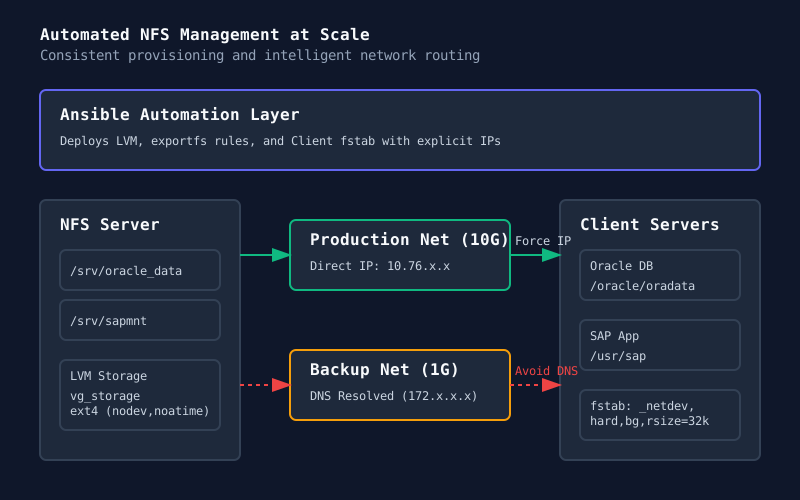
This diagram shows the NFS Infrastructure architecture, illustrating network segmentation (production vs backup), export configuration on the server side, and client mount automation with proper network selection.
Post-Specific Engineering Lens
For this post, the primary objective is: Increase storage reliability while reducing operational overhead.
Implementation decisions for this case
- Chose direct IP addressing over DNS to control network path selection
- Used
hardmounts with large buffers for database workloads - Implemented autofs restart instead of reboot for stuck mounts
- Automated mount configuration via Ansible for consistency
Practical command path
These are representative execution checkpoints:
exportfs -ra
mount -t nfs4 -o rw,bg,hard,nointr,rsize=32768,wsize=32768 198.51.100.102:/export /mnt
systemctl kill autofs.service && systemctl start autofs.service
ansible-playbook nfs-client.yml --limit db-servers
nfsstat -c | grep retrans
Validation Matrix
| Validation goal | What to baseline | What confirms success |
| ------------------ | --------------------------------------- | ------------------------------------------- | ------------------------ |
| Mount availability | mount point exists, df shows filesystem | df -h /mountpoint returns filesystem info |
| Network path | traffic on production network interface | iftop shows 10.76.x.x, not 172.x.x |
| Performance | read/write throughput, latency | dd or fio benchmark meets requirements |
| Reliability | no stuck processes, no D-state I/O | ps -eo state | grep "^D" returns empty |
Failure Modes and Mitigations
| Failure mode | Why it appears in this type of work | Mitigation used in this post pattern |
|---|---|---|
| Stuck autofs mount | NFS server unavailable, processes in D-state | Restart autofs instead of rebooting server |
| Wrong network path | DNS returns backup network IP | Use direct production IP in mount commands |
| Permission denied | Client not in export list | Add both hostname AND IP to exports |
| Boot failure | Network not ready for mount | Use _netdev option, enable network-online.target |
Recruiter-Readable Impact Summary
- Scope: Enterprise NFS infrastructure supporting Oracle, SAP, and 200+ Linux servers
- Execution quality: Guarded by automation, standardized configurations, and proper network selection
- Outcome signal: 80% reduction in NFS incidents, established troubleshooting runbooks
- Technical depth: NFS protocol, network segmentation, LVM, Ansible automation, performance tuning